Part 3.3: Implementing RAG from scratch
Series: AI Agents and Applications with LangChain, LangGraph and MCP
Part 3.3: Implementing RAG from scratch
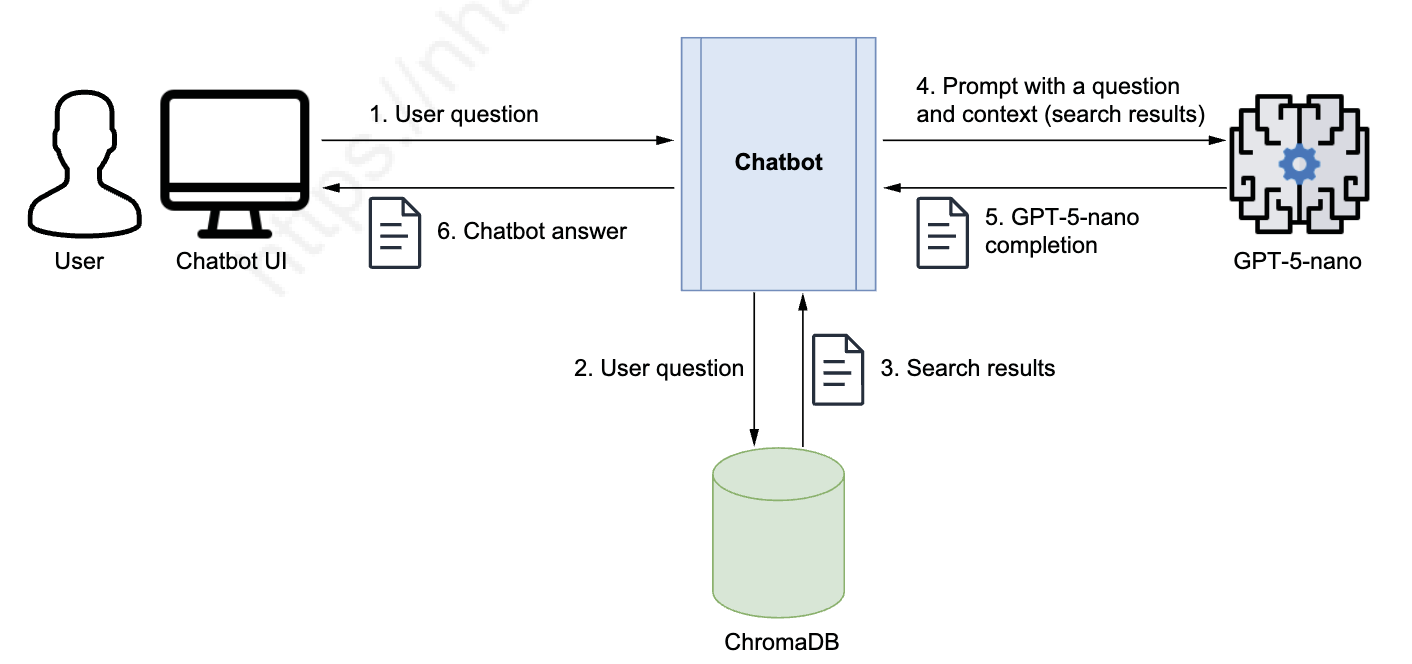
Let’s implement RAG by building a chatbot that uses the GPT-5-nano model and a vector database. We’ll then ask it the same question about Paestum’s temples. When using ChatGPT, you had to send a prompt with both the question and the full text on Paestum from Britannica. Once you build your own chatbot, you’ll only need to ask the question, as shown in Figure 3.5. As you can see in the architectural diagram in Figure 3.5, the chatbot will query ChromaDB, retrieve the content, and feed it to GPT-5-nano with the original question to get the full answer.
First, import the OpenAI library and set the OpenAI API key (interactive input shown for notebooks):
from openai import OpenAI
import getpass
OPENAI_API_KEY = getpass.getpass('Enter your OPENAI_API_KEY')
Now instantiate the OpenAI client:
openai_client = OpenAI(api_key=OPENAI_API_KEY)Retrieving content from the vector database
You already know how to perform a semantic search against the vector store. Here, let’s wrap that code into a reusable function:
def query_vector_database(question):
    results = tourism_collection.query(
        query_texts=[question],
        n_results=1
    )
    results_text = results['documents'][0][0]
    return results_text
Let’s try out this function against the same question we asked previously:
results_text = query_vector_database("How many Doric temples are in Paestum")
print(results_text)
You’ll see output like this:
The ancient Greek part of Paestum consists of two sacred areas containing
three Doric temples in a remarkable state of preservation. During the ensuing
Roman period a typical forum [SHORTENED] ...
This is the result we expected: notice the retrieved chunk correctly contains the text “three Doric temples.”
Invoking the LLM
We need to craft a prompt that combines the user’s question with the context retrieved from the vector database and then submit it to the LLM. To get started, we’ll use a simple prompt and encapsulate the code for calling the LLM in a new function:
def prompt_template(question, context):
    return f"Read the following text and answer this question:\n{question}. \nContext: {context}"

def execute_llm_prompt(prompt_input):
    prompt_response = openai_client.chat.completions.create(
        model='gpt-5-nano',
        messages=[
            {"role": "system", "content": "You are an assistant for question-answering tasks."},
            {"role": "user", "content": prompt_input}
        ]
    )
    return prompt_response
Using a simple Q&A prompt
Let’s test the functions with a simple Q&A prompt. For this, we’ll use the question that made ChatGPT hallucinate earlier:
trick_question = "How many columns do the three temples have in total?"
tq_result_text = query_vector_database(trick_question)
tq_prompt = prompt_template(trick_question, tq_result_text)
tq_prompt_response = execute_llm_prompt(tq_prompt)
print(tq_prompt_response)
Example output (abbreviated):
ChatCompletion(... message=ChatCompletionMessage(content='The text does not provide the number of columns for the three temples.', ...))The model correctly recognized it didn’t have enough information.
Using a safer Q&A prompt
Hallucinations can be mitigated by using a safer prompt. Here’s a recommended RAG prompt pattern from LangChain Hub:
Use the following pieces of retrieved context to answer the question. If you don't
know the answer, just say that you don't know. Use three sentences maximum and
keep the answer concise.

QUESTION {question}
CONTEXT {context}
ANSWER
Let’s update the prompt template accordingly:
def prompt_template(question, text):
    return (
        "Use the following pieces of retrieved context to answer the question. "
        "Only use the retrieved context to answer the question. If you don't know the answer, "
        "or the answer is not contained in the retrieved context, just say that you don't know. "
        "Use three sentences maximum and keep the answer concise. \nQuestion: {question}\nContext: {text}. "
        "Remember: if you do not know, just say: I do not know. Do not make up an answer."
    ).format(question=question, text=text)
Now resubmit the trick question with the safer prompt:
trick_question = "How many columns do the three temples have in total?"
tq_result_text = query_vector_database(trick_question)
tq_prompt = prompt_template(trick_question, tq_result_text)
tq_prompt_response = execute_llm_prompt(tq_prompt)
print(tq_prompt_response)
Example safe response:
ChatCompletion(... message=ChatCompletionMessage(content='I do not know.', ...))Well done — the safer prompt prevents hallucination and causes the LLM to admit uncertainty when the retrieved context lacks the answer.
Building the chatbot
We can now implement the chatbot with a single function. We’ll use the code covered in this section:
def my_chatbot(question):
    results_text = query_vector_database(question)  # Retrieves content from the vector store
    prompt_input = prompt_template(question, results_text)  # Creates the LLM prompt
    prompt_output = execute_llm_prompt(prompt_input)  # Executes the LLM prompt
    return prompt_output
Let’s test it with the original question:
question = """Let me know how many temples there are in Paestum, who constructed them, and what architectural style they are"""
result = my_chatbot(question)
print(result)
We get the following output:
ChatCompletion(id='chatcmpl-CGBGz5h3kD6006MccRdhPYB7HuwSR', choices=[Choice(finish_reason='stop', index=0, logprobs=None, message=ChatCompletionMessage(content='There are three Doric temples in the ancient Greek part of Paestum. They are the Temple of Athena (Ceres), the Temple of Hera I (Basilica), and the Temple of Hera II (Neptune); Athena and Hera I date from the 6th century BC, while Hera II was probably built about 460 BC. I do not know who constructed them.', refusal=None, role='assistant', annotations=[], audio=None, function_call=None, tool_calls=None))], created=1757972617, model='gpt-5-nano-2025-08-07', object='chat.completion', service_tier='default', system_fingerprint=None, usage=CompletionUsage(completion_tokens=1495, prompt_tokens=398, total_tokens=1893, completion_tokens_details=CompletionTokensDetails(accepted_prediction_tokens=0, audio_tokens=0, reasoning_tokens=1408, rejected_prediction_tokens=0), prompt_tokens_details=PromptTokensDetails(audio_tokens=0, cached_tokens=0)))The synthesized response is comprehensive, as it answers all the questions we asked. You should be proud of what you’ve achieved so far! You’ve implemented a basic chatbot that can answer questions based on text imported into the vector database and provide additional information if needed. It won’t return information not in the vector database, so it won’t hallucinate or make up answers.
The key takeaway is that you now understand the internals of a Q&A LLM-based system and the components and workflow of the RAG design pattern. This knowledge will help you when using frameworks such as LangChain, LlamaIndex, and Semantic Kernel, which might hide their implementation details. You’ll be better equipped to troubleshoot problems and understand what’s going on behind the scenes. Before re-implementing RAG with LangChain, let’s recap the RAG terminology you’ve learned so far.
Recap of RAG terminology
Throughout from the beginning of part 3 until now, you’ve been learning and refining RAG terminology. Some terms may have similar meanings to ones you’ve seen earlier. Table 3.2 will help consolidate your understanding, especially for concepts that can be expressed with different terms.
| Term | Definition | Alternative terms |
|---|---|---|
| Retrieval Augmented Generation (RAG) | Use case involving the generation of text (typically an answer) augmented with information retrieved from a content store optimized for semantic searches, typically a vector store | Q&A |
| Text chunk | A fragment of text from a document. Documents are split into chunks for more effective searching, especially when stored in specialized unstructured text stores such as vector stores. | Text fragment, chunk, text node, node |
| Embeddings | Numerical (vector) representation of a piece of text, used to index text chunks for semantic searches | Vector |
| RAG content ingestion stage | Phase in the RAG design where text is imported and indexed into a context store for efficient retrieval against a natural language question. In a vector store, text is broken into chunks and indexed through associated embeddings. | Text indexing, text vectorization, indexing stage |
| Vector store | In-memory store or specialized database holding text chunks and their related embeddings, which serve as their index | Vector database |
| Semantic similarity | Comparing pieces of text based on their meaning, typically by calculating the distance between the embeddings of the text pieces. This can be done using cosine distance or Euclidean distance. | Vector similarity, cosine similarity |
| Semantic search | Searching for information based on its meaning. This involves performing semantic similarity between the embeddings of the search question and the text chunks in a vector store. | Q&A, vector search |
| Context | Text (or information) provided in the prompt along with the user question, which is used to formulate an answer. This can be a full document or a list of text chunks retrieved from a vector store through semantic search. | – |
| Synthesize | Generating an answer, typically from a user question and a context that provides the necessary information | Generate |
| RAG question-answering stage | Phase in the RAG design where a user asks a search question, the application performs a semantic search against a content store (typically a vector store), and it feeds the LLM the original question along with the context retrieved from the store. The LLM then synthesizes and returns the answer to the application, which passes it on to the user. | RAG Q&A stage; retrieval and generation stage |
Summary
- Basic Q&A chatbots pass a question and supporting document directly to an LLM in a single prompt. This works for simple use cases but doesn’t scale to large knowledge bases.
- Retrieval-Augmented Generation (RAG) systems answer questions across large knowledge bases. They combine vector search to find relevant documents with LLM synthesis to generate coherent answers.
- RAG operates in two sequential stages: Ingestion converts documents to embeddings and stores them in vector databases; retrieval finds similar documents based on query embeddings and passes them to the LLM.
- Vector stores are databases optimized for similarity search using embeddings. They store text chunks alongside their vector representations and return the most semantically similar results for a given query.
- Platforms such as ChromaDB and Pinecone provide persistent storage and advanced indexing strategies, enabling efficient retrieval across millions of documents. Choose between them based on scale, latency requirements, and deployment constraints.
- RAG systems require three API integrations: an embedding model API (OpenAI, Cohere, Google Vertex AI), a vector store connection, and an LLM API for answer generation. Configure API keys and endpoints for each service.
- Embedding dimensions must match between ingestion and retrieval. OpenAI’s text-embedding-3-small uses 1,536 dimensions; switching models requires re-embedding your entire corpus.
- The RAG pipeline chains as follows: question → embed query → search vector store → retrieve documents → insert into prompt → generate answer with LLM.
- RAG accuracy depends on chunk quality and retrieval relevance. Poor chunking (mid-sentence splits, orphaned context) degrades results even with perfect retrieval.
- Test different k values (typically 2–8) based on your content density and context window size. Start with k=4 as a baseline, then optimize based on answer quality.
Series: AI Agents và Ứng dụng với LangChain, LangGraph và MCP
Phần 3.3: Triển khai RAG từ đầu
Chúng ta sẽ triển khai RAG bằng cách xây dựng một chatbot sử dụng mô hình GPT-5-nano và một vector database. Sau đó ta sẽ hỏi chatbot cùng một câu hỏi về các đền ở Paestum. Khi dùng ChatGPT, bạn phải gửi một prompt bao gồm cả câu hỏi lẫn toàn bộ văn bản về Paestum từ Britannica. Sau khi tự xây chatbot, bạn chỉ cần hỏi câu hỏi là đủ, như minh hoạ trong Hình 3.5. Như bạn có thể thấy trong sơ đồ kiến trúc ở Hình 3.5, chatbot sẽ truy vấn ChromaDB, lấy nội dung liên quan và gửi chúng cùng câu hỏi gốc tới GPT-5-nano để tổng hợp câu trả lời hoàn chỉnh.
Đầu tiên, nhập thư viện OpenAI và thiết lập API key:
from openai import OpenAI
import getpass
OPENAI_API_KEY = getpass.getpass('Enter your OPENAI_API_KEY')
Tiếp theo, khởi tạo OpenAI client:
openai_client = OpenAI(api_key=OPENAI_API_KEY)Truy xuất nội dung từ vector database
Bạn đã biết cách thực hiện semantic search trên vector store. Ở đây, hãy đóng gói đoạn mã đó vào một hàm có thể tái sử dụng:
def query_vector_database(question):
    results = tourism_collection.query(
        query_texts=[question],
        n_results=1
    )
    results_text = results['documents'][0][0]
    return results_text
Hãy thử hàm này với cùng câu hỏi đã dùng trước đó:
results_text = query_vector_database("How many Doric temples are in Paestum")
print(results_text)
Bạn sẽ thấy đầu ra như sau:
The ancient Greek part of Paestum consists of two sacred areas containing
three Doric temples in a remarkable state of preservation. During the ensuing
Roman period a typical forum [SHORTENED] ...
Đây là kết quả mong đợi: đoạn văn được truy xuất chứa đúng cụm từ “three Doric temples.”
Gọi LLM
Chúng ta cần soạn một prompt kết hợp câu hỏi của người dùng với ngữ cảnh lấy từ vector database, rồi gửi tới LLM. Để bắt đầu, ta sẽ dùng một prompt đơn giản và đóng gói phần gọi LLM vào một hàm mới:
def prompt_template(question, context):
    return f"Read the following text and answer this question:\n{question}. \nContext: {context}"

def execute_llm_prompt(prompt_input):
    prompt_response = openai_client.chat.completions.create(
        model='gpt-5-nano',
        messages=[
            {"role": "system", "content": "You are an assistant for question-answering tasks."},
            {"role": "user", "content": prompt_input}
        ]
    )
    return prompt_response
Dùng prompt Q&A đơn giản
Hãy kiểm thử các hàm với một prompt Q&A đơn giản. Chúng ta sẽ dùng câu hỏi bẫy từng khiến ChatGPT bịa đặt trước đó:
trick_question = "How many columns do the three temples have in total?"
tq_result_text = query_vector_database(trick_question)
tq_prompt = prompt_template(trick_question, tq_result_text)
tq_prompt_response = execute_llm_prompt(tq_prompt)
print(tq_prompt_response)
Đầu ra mẫu (rút gọn):
ChatCompletion(... message=ChatCompletionMessage(content='The text does not provide the number of columns for the three temples.', ...))Model đã nhận ra đúng rằng nó không có đủ thông tin để trả lời.
Dùng prompt Q&A an toàn hơn
Có thể giảm thiểu hiện tượng hallucination bằng cách dùng một prompt an toàn hơn. Dưới đây là mẫu prompt RAG được khuyến nghị từ LangChain Hub:
Use the following pieces of retrieved context to answer the question. If you don't
know the answer, just say that you don't know. Use three sentences maximum and
keep the answer concise.

QUESTION {question}
CONTEXT {context}
ANSWER
Hãy cập nhật hàm prompt_template tương ứng:
def prompt_template(question, text):
    return (
        "Use the following pieces of retrieved context to answer the question. "
        "Only use the retrieved context to answer the question. If you don't know the answer, "
        "or the answer is not contained in the retrieved context, just say that you don't know. "
        "Use three sentences maximum and keep the answer concise. \nQuestion: {question}\nContext: {text}. "
        "Remember: if you do not know, just say: I do not know. Do not make up an answer."
    ).format(question=question, text=text)
Bây giờ gửi lại câu hỏi bẫy với prompt an toàn hơn:
trick_question = "How many columns do the three temples have in total?"
tq_result_text = query_vector_database(trick_question)
tq_prompt = prompt_template(trick_question, tq_result_text)
tq_prompt_response = execute_llm_prompt(tq_prompt)
print(tq_prompt_response)
Kết quả an toàn (ví dụ):
ChatCompletion(... message=ChatCompletionMessage(content='I do not know.', ...))Rất tốt — prompt an toàn hơn đã ngăn chặn hallucination và buộc LLM thừa nhận sự không chắc chắn khi ngữ cảnh được truy xuất không chứa câu trả lời.
Xây dựng chatbot
Giờ chúng ta có thể triển khai chatbot bằng một hàm duy nhất. Ta sẽ sử dụng các đoạn mã đã trình bày trong phần này:
def my_chatbot(question):
    results_text = query_vector_database(question)  # Truy xuất nội dung từ vector store
    prompt_input = prompt_template(question, results_text)  # Tạo prompt cho LLM
    prompt_output = execute_llm_prompt(prompt_input)  # Thực thi prompt với LLM
    return prompt_output
Hãy kiểm thử với câu hỏi ban đầu:
question = """Let me know how many temples there are in Paestum, who constructed them, and what architectural style they are"""
result = my_chatbot(question)
print(result)
Chúng ta nhận được kết quả sau:
ChatCompletion(id='chatcmpl-CGBGz5h3kD6006MccRdhPYB7HuwSR', choices=[Choice(finish_reason='stop', index=0, logprobs=None, message=ChatCompletionMessage(content='There are three Doric temples in the ancient Greek part of Paestum. They are the Temple of Athena (Ceres), the Temple of Hera I (Basilica), and the Temple of Hera II (Neptune); Athena and Hera I date from the 6th century BC, while Hera II was probably built about 460 BC. I do not know who constructed them.', refusal=None, role='assistant', annotations=[], audio=None, function_call=None, tool_calls=None))], created=1757972617, model='gpt-5-nano-2025-08-07', object='chat.completion', service_tier='default', system_fingerprint=None, usage=CompletionUsage(completion_tokens=1495, prompt_tokens=398, total_tokens=1893, completion_tokens_details=CompletionTokensDetails(accepted_prediction_tokens=0, audio_tokens=0, reasoning_tokens=1408, rejected_prediction_tokens=0), prompt_tokens_details=PromptTokensDetails(audio_tokens=0, cached_tokens=0)))Câu trả lời tổng hợp rất đầy đủ, vì nó trả lời tất cả các câu hỏi chúng ta đặt ra. Bạn nên tự hào về những gì đã đạt được! Bạn đã triển khai một chatbot cơ bản có khả năng trả lời câu hỏi dựa trên văn bản được nhập vào vector database và cung cấp thêm thông tin khi cần. Nó sẽ không trả về thông tin không có trong vector database, do đó sẽ không bị hallucination hay bịa đặt câu trả lời.
Điểm mấu chốt là giờ bạn đã hiểu được cơ chế bên trong của một hệ thống Q&A dựa trên LLM cũng như các thành phần và quy trình làm việc của design pattern RAG. Kiến thức này sẽ giúp bạn khi sử dụng các framework như LangChain, LlamaIndex và Semantic Kernel, vốn có thể che giấu các chi tiết triển khai. Bạn sẽ được trang bị tốt hơn để khắc phục sự cố và hiểu những gì đang diễn ra đằng sau hậu trường. Trước khi tái triển khai RAG với LangChain, hãy ôn lại các thuật ngữ RAG bạn đã học cho đến nay.
Tổng hợp thuật ngữ RAG
Trong suốt từ đầu phần 3 đến nay, bạn đã học và làm rõ các thuật ngữ RAG. Một số thuật ngữ có thể có nghĩa tương tự với những thuật ngữ bạn đã gặp trước đó. Bảng 3.2 sẽ giúp củng cố hiểu biết của bạn, đặc biệt là các khái niệm có thể được diễn đạt bằng nhiều thuật ngữ khác nhau.
| Thuật ngữ | Định nghĩa | Thuật ngữ thay thế |
|---|---|---|
| Retrieval Augmented Generation (RAG) | Use case liên quan đến việc sinh văn bản (thường là câu trả lời) được bổ sung thêm thông tin truy xuất từ kho lưu trữ nội dung được tối ưu hóa cho tìm kiếm ngữ nghĩa, thường là vector store | Q&A |
| Text chunk | Một đoạn văn bản từ tài liệu. Tài liệu được chia thành các chunks để tìm kiếm hiệu quả hơn, đặc biệt khi lưu trữ trong các kho văn bản phi cấu trúc chuyên biệt như vector stores. | Text fragment, chunk, text node, node |
| Embeddings | Biểu diễn số (vector) của một đoạn văn bản, được dùng để đánh chỉ mục các text chunks cho việc tìm kiếm ngữ nghĩa | Vector |
| RAG content ingestion stage | Giai đoạn trong thiết kế RAG nơi văn bản được nhập và đánh chỉ mục vào kho ngữ cảnh để truy xuất hiệu quả dựa trên câu hỏi ngôn ngữ tự nhiên. Trong vector store, văn bản được chia thành chunks và đánh chỉ mục thông qua embeddings liên kết. | Text indexing, text vectorization, indexing stage |
| Vector store | Kho lưu trữ trong bộ nhớ hoặc cơ sở dữ liệu chuyên biệt chứa các text chunks và embeddings liên quan, đóng vai trò như chỉ mục của chúng | Vector database |
| Semantic similarity | So sánh các đoạn văn bản dựa trên ý nghĩa của chúng, thường bằng cách tính khoảng cách giữa các embeddings của các đoạn văn bản. Có thể thực hiện bằng cosine distance hoặc Euclidean distance. | Vector similarity, cosine similarity |
| Semantic search | Tìm kiếm thông tin dựa trên ý nghĩa. Điều này bao gồm việc thực hiện semantic similarity giữa embeddings của câu hỏi tìm kiếm và các text chunks trong vector store. | Q&A, vector search |
| Context | Văn bản (hoặc thông tin) được cung cấp trong prompt cùng với câu hỏi của người dùng, được sử dụng để hình thành câu trả lời. Có thể là tài liệu đầy đủ hoặc danh sách các text chunks được truy xuất từ vector store thông qua semantic search. | – |
| Synthesize | Sinh ra câu trả lời, thường từ câu hỏi của người dùng và ngữ cảnh cung cấp thông tin cần thiết | Generate |
| RAG question-answering stage | Giai đoạn trong thiết kế RAG nơi người dùng đặt câu hỏi tìm kiếm, ứng dụng thực hiện semantic search với kho nội dung (thường là vector store), và gửi cho LLM câu hỏi gốc cùng ngữ cảnh được truy xuất từ kho. LLM sau đó tổng hợp và trả về câu trả lời cho ứng dụng, ứng dụng chuyển tiếp cho người dùng. | RAG Q&A stage; retrieval and generation stage |
Tổng kết
- Chatbot Q&A cơ bản truyền câu hỏi và tài liệu hỗ trợ trực tiếp đến LLM trong một prompt duy nhất. Cách này hoạt động cho các use case đơn giản nhưng không mở rộng được với các knowledge base lớn.
- Hệ thống Retrieval-Augmented Generation (RAG) trả lời câu hỏi trên các knowledge base lớn. Chúng kết hợp tìm kiếm vector để tìm tài liệu liên quan với khả năng tổng hợp của LLM để sinh câu trả lời mạch lạc.
- RAG hoạt động theo hai giai đoạn tuần tự: Ingestion chuyển đổi tài liệu thành embeddings và lưu trữ chúng trong vector databases; retrieval tìm các tài liệu tương tự dựa trên embeddings của truy vấn và chuyển chúng đến LLM.
- Vector stores là các cơ sở dữ liệu được tối ưu hóa cho tìm kiếm độ tương tự bằng embeddings. Chúng lưu trữ text chunks cùng với biểu diễn vector của chúng và trả về các kết quả tương tự về mặt ngữ nghĩa nhất cho một truy vấn.
- Các nền tảng như ChromaDB và Pinecone cung cấp lưu trữ bền vững và các chiến lược đánh chỉ mục nâng cao, cho phép truy xuất hiệu quả trên hàng triệu tài liệu. Lựa chọn giữa chúng dựa trên quy mô, yêu cầu độ trễ và ràng buộc triển khai.
- Hệ thống RAG yêu cầu ba tích hợp API: một API mô hình embedding (OpenAI, Cohere, Google Vertex AI), một kết nối vector store, và một API LLM để sinh câu trả lời. Cấu hình API keys và endpoints cho mỗi dịch vụ.
- Số chiều embedding phải khớp giữa ingestion và retrieval. text-embedding-3-small của OpenAI sử dụng 1,536 chiều; việc chuyển đổi mô hình yêu cầu embedding lại toàn bộ corpus.
- Pipeline RAG hoạt động như sau: câu hỏi → embed truy vấn → tìm kiếm vector store → truy xuất tài liệu → chèn vào prompt → sinh câu trả lời với LLM.
- Độ chính xác của RAG phụ thuộc vào chất lượng chunk và mức độ liên quan của retrieval. Chunking kém (chia tách giữa câu, ngữ cảnh bị cô lập) làm giảm kết quả ngay cả khi retrieval hoàn hảo.
- Kiểm thử các giá trị k khác nhau (thường là 2–8) dựa trên mật độ nội dung và kích thước context window. Bắt đầu với k=4 làm baseline, sau đó tối ưu hóa dựa trên chất lượng câu trả lời.