Part 3.1: Building Q&A Chatbots Over Large Knowledge Bases
Series: AI Agents & Applications with LangChain, LangGraph and MCP
Part: 3.1 — Building Q&A Chatbots Over Large Knowledge Bases
In Part 3, you learned the fundamentals of RAG and built a basic Q&A chatbot that works with a single document. While that approach is useful for understanding the core concepts, real-world applications require something more sophisticated—the ability to search across multiple documents, large knowledge bases, and diverse content sources.
This part will show you how to scale your Q&A chatbot from handling a single text to querying enterprise-level knowledge bases containing thousands of documents across various formats and locations. You’ll learn how to overcome the fundamental challenges of context window limitations, retrieval efficiency, and answer accuracy at scale.
By the end of this part, you’ll understand how to build production-ready Q&A systems that can intelligently retrieve relevant information from vast document collections and synthesize accurate, grounded answers—all while maintaining conversational context and providing transparent source citations.
Let’s start by understanding why the simple approach from Part 3 doesn’t scale and what architectural changes are needed to handle real-world complexity.
From Single Document to Knowledge Base: The Challenge
The basic LLM-based Q&A chatbot pattern you learned in Part 3 works well for simple scenarios. Let’s recap that approach:
Simple Q&A Chatbot Design (Single Document):
- You send a prompt to the chatbot containing:
- The complete text you want to search within (context)
- The question you want answered
- The prompt explicitly instructs the chatbot to:
- Formulate answers using only the provided text
- Admit when information isn’t found (“I don’t know”)
- The chatbot creates a stateful session:
- Retains conversation history
- Enables follow-up questions
- Refines answers iteratively without resending context
This approach works beautifully when your content fits comfortably within the model’s context window. However, real-world enterprise scenarios introduce significant challenges.
The Enterprise Knowledge Base Challenge
Imagine you’re building a Q&A chatbot for a company that needs to answer questions about information scattered across multiple sources:
- Intranet pages—Company policies, announcements, documentation
- Shared folders—Departmental documents, project files
- Various document formats—PDF reports, DOCX specifications, TXT notes, PowerPoint presentations
- Databases—Structured records, customer information
- Email archives—Institutional knowledge buried in conversations
- Code repositories—Technical documentation, API references
The fundamental problem: You cannot include all of this content in a single prompt along with the user’s question.
Why the Simple Approach Fails at Scale
When designing an enterprise Q&A chatbot, you face several critical obstacles:
1. Context Window Limitations
Even the most advanced LLMs have finite context windows. While models like GPT-4 support up to 128K tokens, enterprise knowledge bases often contain millions or billions of tokens. Trying to fit everything into the context would:
- Exceed the model’s limits—Most content simply won’t fit
- Increase costs dramatically—You pay per token for input and output
- Slow down response times—Larger contexts take longer to process
- Reduce answer quality—Models perform worse when overwhelmed with irrelevant information
2. Relevance and Precision
Providing the model with less context, but more focused and relevant context, actually improves performance:
- Better accuracy—The model isn’t distracted by loosely related information
- Faster processing—Smaller, targeted context is processed more quickly
- Lower costs—You only pay for the tokens you actually need
- Clearer citations—It’s easier to trace which specific passages informed the answer
3. The Need for Intelligent Retrieval
To solve this, your chatbot must be able to:
- Access the entire knowledge base without loading it all at once
- Retrieve only the specific content needed to answer a given question
- “Understand” the knowledge base semantically—not just through keyword matching
- Allow natural language queries—Users shouldn’t need to know exactly which documents contain the answer
As illustrated in Figure 3.2, the ideal enterprise Q&A chatbot enables users to ask questions naturally without manually supplying background context each time.
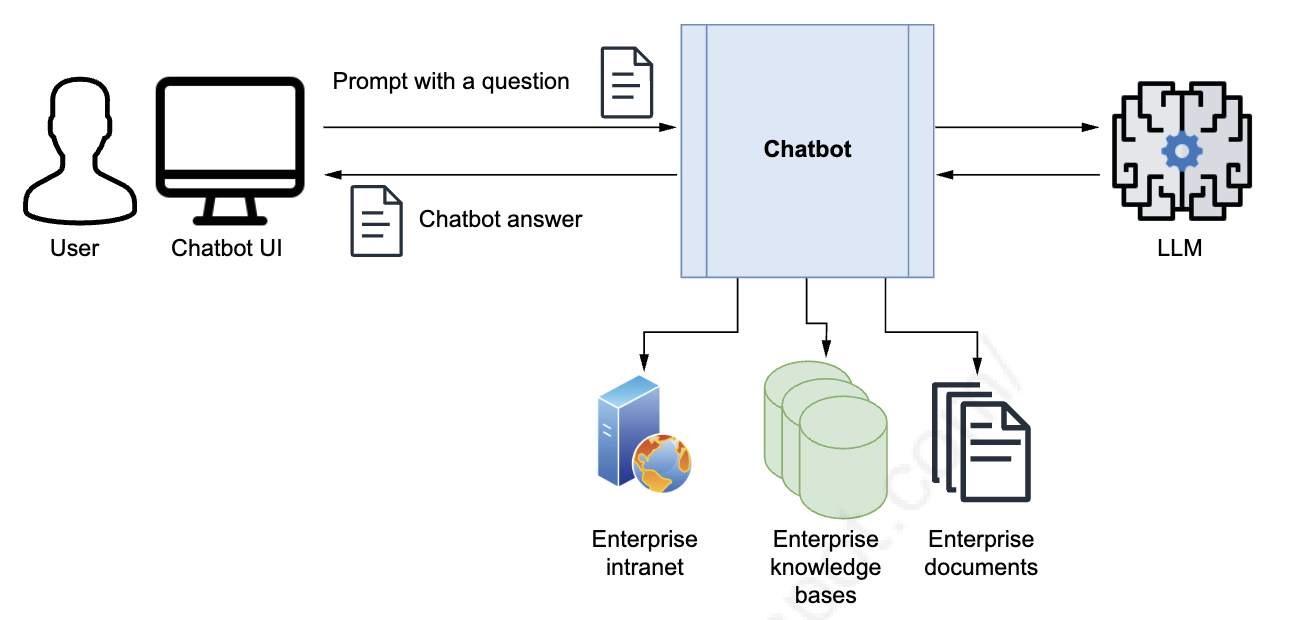 Figure 3.2: Hypothetical design for an enterprise Q&A chatbot. The knowledge of the chatbot is expanded with various data sources: the enterprise’s intranet, knowledge bases, and documents. Users can ask questions naturally, and the system automatically retrieves relevant information, synthesizes answers, and provides source citations.
Can You Just Connect ChatGPT to Your Data?
Looking at Figure 3.2, you might wonder: Can I just connect ChatGPT (or Gemini, Claude, etc.) to my company’s intranet, knowledge bases, and documents, so I only need to send the question in the prompt—without manually including context each time?
Unfortunately, the answer is no—at least not directly. Standard ChatGPT cannot access your local or private data. The architecture shown in Figure 3.2 doesn’t work out-of-the-box with public LLM interfaces.
What About ChatGPT Plus and Custom GPTs?
OpenAI offers My GPTs (part of ChatGPT Plus), which allows you to:
- Upload documents for the chatbot to reference
- Create custom versions of ChatGPT with specific instructions
- Enable basic document lookup for later queries
This is convenient for simple use cases—like creating a chatbot that answers questions about a handful of uploaded PDFs. However, it has significant limitations:
- Limited control over how the chatbot searches and retrieves information
- No visibility into which document chunks are being used
- Lack of customization for chunking strategies, embedding models, or retrieval algorithms
- Scalability constraints when dealing with thousands of documents
- No integration with enterprise systems, databases, or real-time data sources
For production enterprise applications where you need full control over how the chatbot interacts with text sources and the LLM, you need a different approach.
Enter the RAG Design Pattern
This is where Retrieval-Augmented Generation (RAG) becomes essential. RAG is not a specific tool or product—it’s a design pattern that gives you complete control over:
- Document ingestion—How documents are loaded, parsed, and prepared
- Chunking strategy—How large documents are split into meaningful pieces
- Embedding models—Which models convert text to semantic vectors
- Vector stores—Where and how embeddings are stored and searched
- Retrieval algorithms—How the most relevant chunks are identified
- LLM integration—How retrieved context is combined with the user’s query
- Source tracking—How to cite which documents contributed to each answer
By implementing RAG yourself, you can build a Q&A system that scales to enterprise knowledge bases while maintaining transparency, control, and customization.
What Changes in the Architecture?
To handle these challenges, we need to add several key components to our basic Q&A chatbot:
Components Added:
- Document Ingestion Pipeline—Load, parse, and prepare documents from various sources
- Text Chunking Strategy—Break large documents into semantically meaningful pieces
- Embedding Generation—Convert text chunks into semantic vectors
- Vector Store—Efficiently store and search millions of embeddings
- Retrieval System—Find the most relevant chunks for a given query
- Re-ranking (Optional)—Further refine which chunks are most useful
- Source Citation—Track which documents contributed to each answer
In the following sections, you’ll learn how to implement each of these components, building a full-scale RAG system capable of handling enterprise knowledge bases with thousands of documents across multiple formats and locations.
Let’s start by understanding how to ingest and prepare documents for semantic search.
The RAG Design Pattern
The Retrieval-Augmented Generation (RAG) design pattern is the classic solution for building Q&A chatbots that can search across large knowledge bases. Let’s break down what RAG stands for and how it works:
Understanding RAG Components
R — Retrieval
This step involves retrieving context from a pre-prepared data source, typically a vector store optimized for semantic search. Retrieval is the foundational component of the RAG architecture—it’s what enables your chatbot to find relevant information from vast document collections without loading everything into memory.
A — Augmented
This means the answer is improved or enhanced by the context provided during the retrieval step. Rather than relying solely on the LLM’s internal knowledge (which can be outdated or incomplete), the model’s response is grounded in the specific documents you’ve retrieved.
G — Generation
This refers to generating the answer to your question. Since this book focuses on LLMs and generative AI, answer generation is performed by an LLM, requiring the chatbot to interact with it. The LLM synthesizes information from the retrieved context to produce coherent, accurate responses.
Where Is Information Retrieved From?
You might wonder: Where does this information come from, and how is it retrieved? The key is preparing your information so your custom chatbot can easily access and use it to augment the LLM’s generated answer.
The RAG design pattern consists of two distinct stages:
1. Content Ingestion Stage (Indexing)
All the content users will query is stored in a specialized database and indexed in a format optimized for efficient retrieval. This stage involves:
- Document loading—Reading files from various sources (PDFs, DOCX, web pages, databases)
- Text chunking—Breaking large documents into smaller, semantically meaningful pieces
- Embedding generation—Converting text chunks into numerical vectors that capture semantic meaning
- Vector storage—Storing embeddings in a vector database (the “special database”) optimized for similarity search
- Indexing—Creating efficient data structures that enable fast retrieval
This preprocessing step happens before users start asking questions. Think of it as building a searchable library catalog—you organize everything once so it can be quickly found later.
2. Question-Answering Stage (Q&A: Retrieval and Generation)
When a user asks a question, the chatbot:
- Converts the question to an embedding—Using the same embedding model from the ingestion stage
- Retrieves relevant context—Searches the vector store for the most similar chunks to the question
- Augments the prompt—Combines the user’s question with the retrieved context
- Generates the answer—Sends the augmented prompt to the LLM, which synthesizes a response grounded in the retrieved information
- Returns the answer—Delivers the response to the user, often with source citations
This happens in real-time for every user query, enabling dynamic, context-aware responses.
Why This Two-Stage Approach?
Separating ingestion from querying provides several advantages:
- Scalability—Index millions of documents once, query them thousands of times
- Performance—Retrieval is fast because embeddings and indexes are pre-computed
- Flexibility—Update your knowledge base by re-running ingestion without changing the Q&A logic
- Cost efficiency—You only pay for LLM tokens during Q&A, not during ingestion
Now that you understand the RAG architecture at a high level, let’s dive into each stage in detail, starting with how to ingest and prepare your documents for semantic search.
Content Ingestion Stage (Indexing)
Before users can query the Q&A chatbot, you need to store relevant content—such as enterprise documents from various sources and formats—into a vector store, a specialized database optimized for quick search and retrieval. This preparation stage is critical to the success of your RAG system.
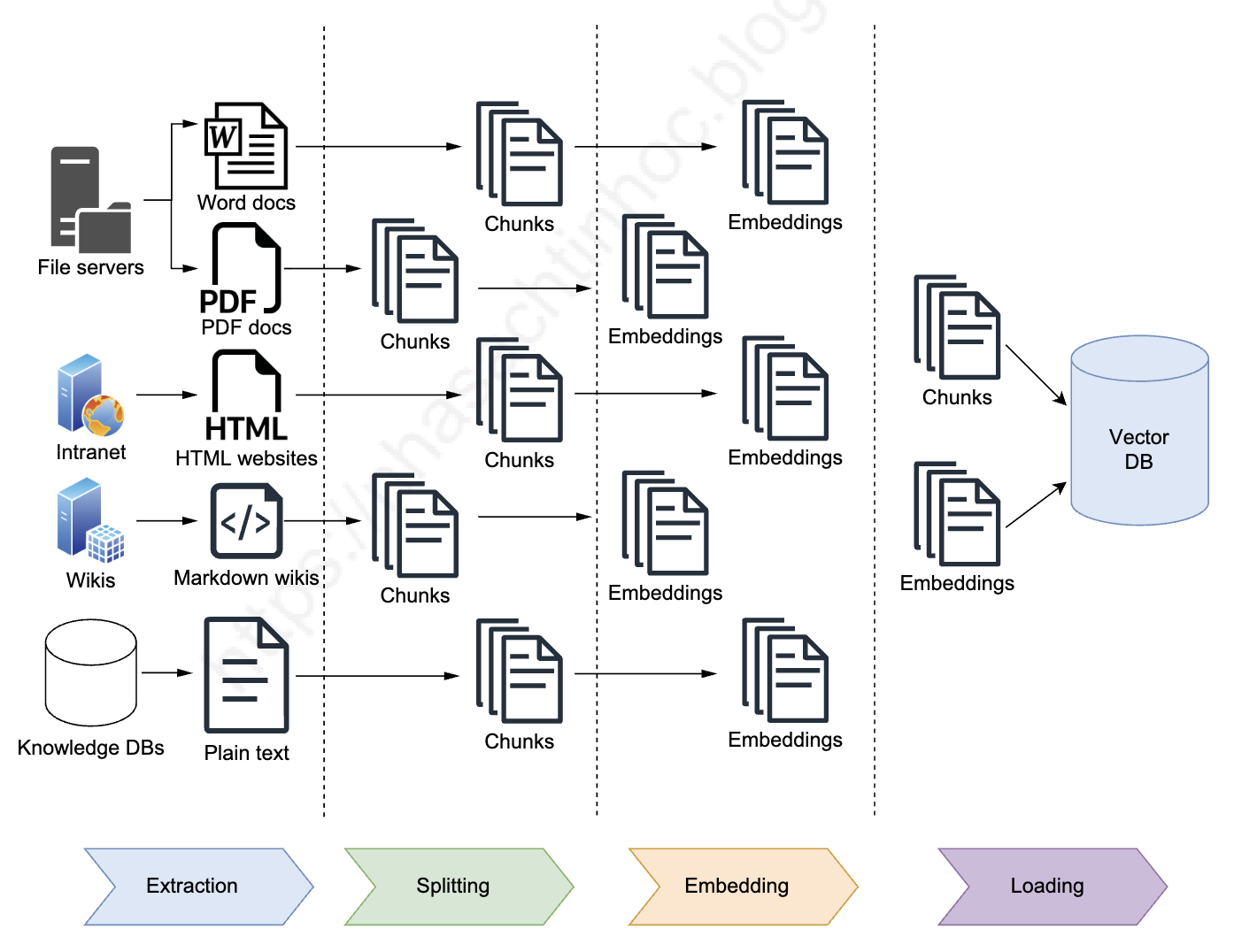 Figure 3.3: RAG content ingestion stage. Documents are extracted from sources, split into chunks, and converted into embeddings while being stored in a vector database, which stores a copy of the original chunks and their embeddings (vector form).
The Ingestion Process
During the content ingestion stage, several key transformations occur:
1. Text Extraction
Text is extracted from various source formats:
- PDFs—Technical documentation, reports, manuals
- DOCX files—Specifications, policies, procedures
- Web pages—Intranet content, wikis, knowledge bases
- Databases—Structured records, customer information
- Plain text—Notes, code comments, README files
2. Chunking
The extracted text is split into small chunks—typically 500-1000 characters or 100-300 tokens, depending on your needs. Each chunk becomes a retrievable unit of information.
Why is chunking crucial?
- Embedding model limitations—Most embedding models have maximum input sizes (e.g., 8,192 tokens for OpenAI’s text-embedding-ada-002)
- Precision in retrieval—You want search to target small, relevant content pieces instead of large, mixed-relevance sections
- Better context quality—Smaller, focused chunks provide clearer context to the LLM than large, rambling sections
- Efficiency—Retrieving 3-5 relevant chunks (1,500-5,000 tokens) is more efficient than retrieving entire documents (50,000+ tokens)
3. Embedding Generation
Each chunk is transformed into an embedding—a numerical vector representation that captures the semantic meaning of the text. These vectors typically have hundreds or thousands of dimensions (e.g., 1,536 dimensions for OpenAI’s embeddings).
You can create embeddings using:
- Vector store’s proprietary model (if available)—Some vector databases include built-in embedding generation
- LLM provider’s model—Such as OpenAI’s
text-embedding-ada-002ortext-embedding-3-small - Dedicated embedding library—Open-source models like Sentence-BERT, all-MiniLM-L6-v2, or specialized models for specific domains
4. Vector Storage
The embeddings and their corresponding content chunks are stored together in a vector database. The database maintains:
- Original text chunks—So they can be retrieved and shown to the LLM
- Embeddings (vectors)—For similarity search and retrieval
- Metadata—Such as source file, page number, timestamp, author
- Indexes—Optimized data structures (like HNSW, IVF) for fast similarity search
Why Embeddings Enable Semantic Search
The purpose of embeddings is to index content for efficient semantic lookup during the Q&A stage. This means the text in the user’s question doesn’t need to match the text in the results exactly to produce relevant answers.
Example: Semantic Matching Without Exact Keywords
Querying the vector store for “feline animals” will return chunks mentioning:
- cat
- lion
- tiger
- leopard
- domestic cats
…even if the word “feline” isn’t in any document chunk!
This works because the embedding model learned during training that “feline,” “cat,” “lion,” and “tiger” are semantically related concepts. When you search for “feline animals,” the embedding vector is mathematically close to the embedding vectors of chunks containing “cat,” “lion,” and “tiger.”
Key Takeaways
- Ingestion happens once (or periodically when updating your knowledge base)
- Chunking strategy matters—Too small loses context, too large reduces precision
- Embedding quality determines search quality—Better embeddings = better retrieval
- Metadata helps filtering—You can filter by source, date, category before similarity search
With your content properly indexed in the vector store, you’re ready for the second stage: real-time question answering. Let’s explore how that works next.
Question-Answering Stage (Retrieval and Generation)
Once the information has been split into small chunks, transformed into embeddings, and stored in a vector store, users can query your Q&A chatbot. This is where the magic happens—turning indexed knowledge into real-time answers.
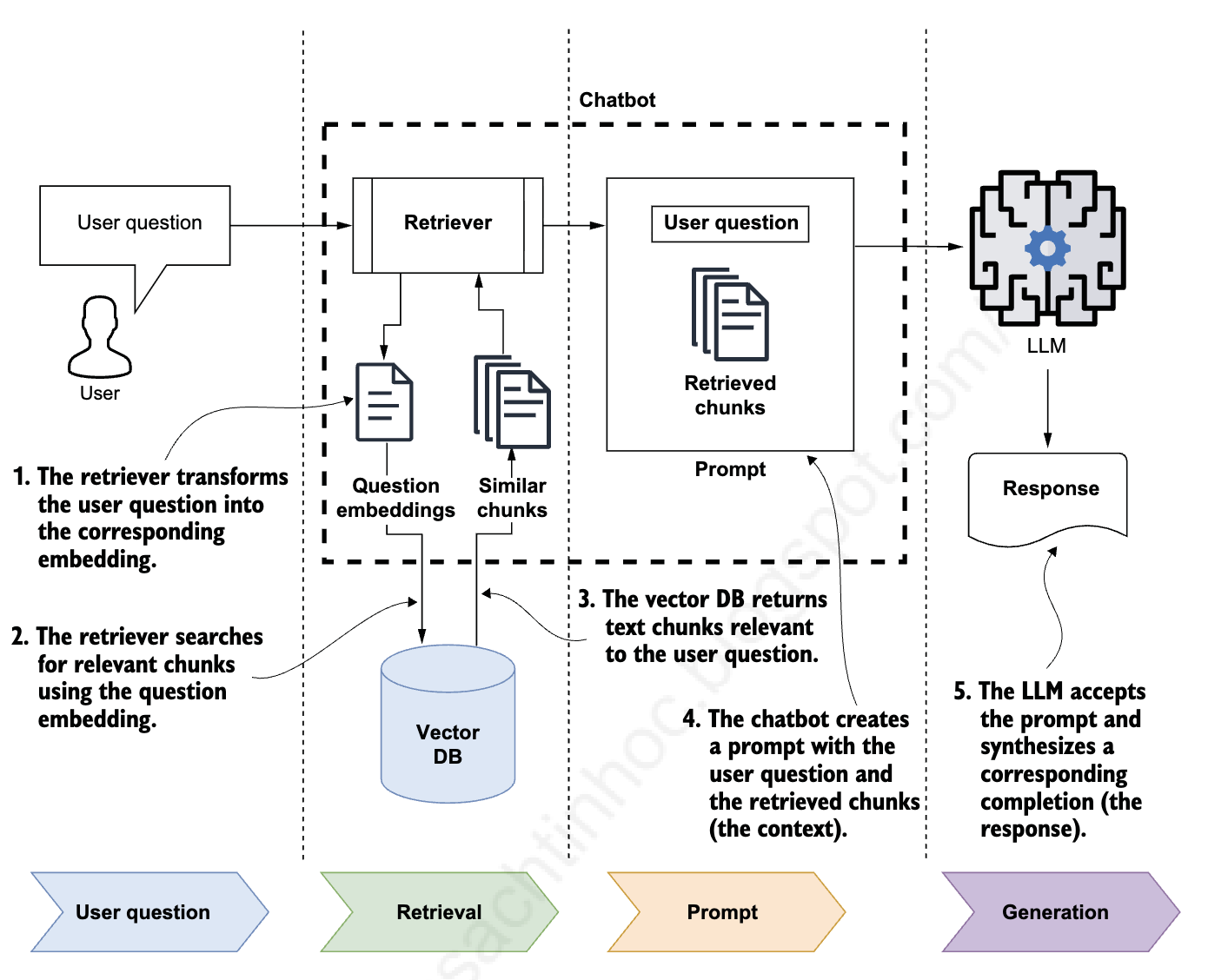 Figure 3.4: RAG Q&A stage showing the complete retrieval and generation workflow. The chatbot uses a retriever to transform questions into embeddings, performs similarity search, retrieves relevant chunks, and sends them to the LLM for answer synthesis.
The Q&A Stage Workflow
Let’s walk through the five-step process that occurs every time a user asks a question:
Step 1: Question Embedding
The chatbot uses a retriever to transform the user’s question into embeddings. This is the same embedding model used during the ingestion stage, ensuring that questions and documents exist in the same semantic vector space.
Step 2: Similarity Search
The retriever uses the question embedding to perform a similarity search in the vector store. It calculates the mathematical distance (cosine similarity, Euclidean distance, or dot product) between the question vector and all stored chunk vectors.
Step 3: Relevant Chunks Retrieved
The vector store returns several relevant text chunks—typically the top 3-10 chunks whose embeddings are closest to the query. These chunks are ranked by vector distance, with the most similar appearing first.
Step 4: Context Construction
The retrieved content is fed into a prompt as “context” along with the original user question. This augmented prompt might look like:
Context:
[Chunk 1: Most relevant passage...]
[Chunk 2: Second most relevant passage...]
[Chunk 3: Third most relevant passage...]

Question: [User's original question]

Please answer the question based only on the provided context. If the answer is not in the context, say "I don't know."
Step 5: Answer Generation
The chatbot sends the augmented prompt to the LLM, which synthesizes a response and returns it to the user. The LLM draws information from the retrieved chunks to formulate an accurate, grounded answer.
How the Retriever Works
When the chatbot receives a user question, here’s what happens under the hood:
- Natural language → Vector: The retriever converts the question into a vector representation using the same embedding model from the ingestion stage
- Vector → Similarity scores: It queries the vector store by calculating similarity between the question vector and stored chunk vectors
- Ranking: Chunks are ranked by vector distance—smaller distance means higher semantic similarity
- Selection: The top-k most similar chunks are selected (typically k = 3-10)
- Return: These chunks, along with metadata (source file, page number, etc.), are returned to the chatbot
Similarity Search Explained
The similarity search is the core operation that makes RAG work:
- Cosine similarity: Measures the angle between two vectors (0 = orthogonal/unrelated, 1 = identical direction/highly similar)
- Euclidean distance: Measures straight-line distance between vectors in high-dimensional space
- Dot product: Measures alignment between vectors, combining magnitude and direction
Most vector stores use Approximate Nearest Neighbor (ANN) algorithms like HNSW (Hierarchical Navigable Small World) or IVF (Inverted File Index) to make similarity search fast—even across millions of vectors.
From Single Document to Vector Database
This final step is similar to the basic Q&A over a single document use case you learned in Part 3. You provide the LLM with:
- The initial question—What the user wants to know
- A context—Information needed to answer the question
The key differences:
Single Document Approach:
- Context = entire input text provided manually in the prompt
- Limited by context window size
- No preprocessing required
- Works for small, known documents
RAG with Vector Database:
- Context = chunks retrieved automatically from vector store
- Scales to millions of documents
- Requires preprocessing (ingestion stage)
- Only relevant fragments are included, not entire documents
Role Separation: Orchestrator vs. LLM
The role that ChatGPT played in the basic single-document chatbot is now split between two components:
-
Orchestrating Chatbot (Retriever):
- Accepts the user’s query
- Converts it to embeddings
- Retrieves relevant information from the vector store
- Constructs the augmented prompt
- Manages the conversation flow
-
LLM (Generator):
- Receives the augmented prompt
- Synthesizes the answer from retrieved context
- Returns the response
- Does NOT perform retrieval—it only generates based on what’s provided
Key Advantages of This Architecture
- Scalability: Works with knowledge bases containing millions of documents
- Efficiency: Only relevant chunks are sent to the LLM, reducing token costs
- Accuracy: LLM focuses on the most relevant information, not distracted by unrelated content
- Transparency: You can see exactly which chunks were retrieved and used
- Control: You decide how many chunks to retrieve, which embedding model to use, and how to rank results
What’s Next?
Now that you understand the high-level architecture of the RAG design pattern—both the ingestion stage and the Q&A stage—you’re ready to dive into one of its most critical components: the vector store.
In the next section, we’ll explore:
- What vector stores are and how they differ from traditional databases
- Popular vector store options (ChromaDB, Pinecone, Weaviate, Qdrant)
- How to choose the right vector store for your use case
- Setting up your first vector store
After that, you’ll be ready to attempt your first RAG implementation and build a production-ready Q&A chatbot!
Continue to Part 3.2: Understanding Vector Stores for RAG to dive deep into how vector stores work and choose the right one for your application.
Trong Part 3, bạn đã học các nguyên tắc cơ bản của RAG và xây dựng một chatbot Q&A cơ bản hoạt động với một tài liệu duy nhất. Mặc dù cách tiếp cận đó hữu ích để hiểu các khái niệm cốt lõi, các ứng dụng thực tế yêu cầu một cái gì đó tinh vi hơn—khả năng tìm kiếm trên nhiều tài liệu, cơ sở kiến thức lớn và nguồn nội dung đa dạng.
Phần này sẽ chỉ cho bạn cách mở rộng chatbot Q&A của bạn từ xử lý một văn bản duy nhất đến truy vấn cơ sở kiến thức cấp doanh nghiệp chứa hàng nghìn tài liệu trên nhiều định dạng và vị trí khác nhau. Bạn sẽ học cách vượt qua các thách thức cơ bản về giới hạn context window, hiệu quả truy xuất và độ chính xác của câu trả lời ở quy mô lớn.
Đến cuối phần này, bạn sẽ hiểu cách xây dựng các hệ thống Q&A production-ready có thể truy xuất thông minh thông tin liên quan từ các bộ sưu tập tài liệu khổng lồ và tổng hợp các câu trả lời chính xác, có căn cứ—tất cả trong khi duy trì ngữ cảnh hội thoại và cung cấp trích dẫn nguồn minh bạch.
Hãy bắt đầu bằng cách hiểu tại sao cách tiếp cận đơn giản từ Part 3 không mở rộng được và những thay đổi kiến trúc nào cần thiết để xử lý độ phức tạp thực tế.
Từ Tài Liệu Đơn Lẻ Đến Knowledge Base: Thách Thức
Mẫu chatbot Q&A dựa trên LLM cơ bản mà bạn đã học trong Part 3 hoạt động tốt cho các kịch bản đơn giản. Hãy tóm tắt lại cách tiếp cận đó:
Thiết Kế Chatbot Q&A Đơn Giản (Tài Liệu Đơn Lẻ):
- Bạn gửi một prompt đến chatbot chứa:
- Văn bản đầy đủ bạn muốn tìm kiếm trong đó (ngữ cảnh)
- Câu hỏi bạn muốn được trả lời
- Prompt hướng dẫn rõ ràng chatbot:
- Xây dựng câu trả lời chỉ sử dụng duy nhất văn bản được cung cấp
- Thừa nhận khi không tìm thấy thông tin (“Tôi không biết”)
- Chatbot tạo một stateful session:
- Giữ lại lịch sử hội thoại
- Cho phép các câu hỏi tiếp theo
- Tinh chỉnh câu trả lời lặp đi lặp lại mà không cần gửi lại ngữ cảnh
Cách tiếp cận này hoạt động tuyệt vời khi nội dung của bạn vừa với context window của mô hình. Tuy nhiên, các kịch bản doanh nghiệp thực tế đưa ra những thách thức đáng kể.
Thách Thức Của Enterprise Knowledge Base
Hãy tưởng tượng bạn đang xây dựng một chatbot Q&A cho một công ty cần trả lời các câu hỏi về thông tin rải rác trên nhiều nguồn:
- Trang intranet—Chính sách công ty, thông báo, tài liệu
- Shared folders—Tài liệu phòng ban, file dự án
- Nhiều định dạng tài liệu—Báo cáo PDF, đặc tả DOCX, ghi chú TXT, bài thuyết trình PowerPoint
- Databases—Bản ghi có cấu trúc, thông tin khách hàng
- Email archives—Kiến thức tổ chức chôn trong các cuộc hội thoại
- Code repositories—Tài liệu kỹ thuật, tham chiếu API
Vấn đề cơ bản: Bạn không thể bao gồm tất cả nội dung này trong một prompt duy nhất cùng với câu hỏi của người dùng.
Tại Sao Cách Tiếp Cận Đơn Giản Thất Bại Ở Quy Mô Lớn
Khi thiết kế chatbot Q&A doanh nghiệp, bạn đối mặt với một số trở ngại quan trọng:
1. Giới Hạn Context Window
Ngay cả các LLM tiên tiến nhất cũng có context window hữu hạn. Trong khi các mô hình như GPT-4 hỗ trợ lên đến 128K tokens, cơ sở kiến thức doanh nghiệp thường chứa hàng triệu hoặc hàng tỷ tokens. Cố gắng nhồi tất cả mọi thứ vào context sẽ:
- Vượt quá giới hạn của mô hình—Hầu hết nội dung đơn giản là không vừa
- Tăng chi phí đáng kể—Bạn trả tiền cho mỗi token đầu vào và đầu ra
- Làm chậm thời gian phản hồi—Context lớn hơn mất nhiều thời gian xử lý hơn
- Giảm chất lượng câu trả lời—Mô hình hoạt động kém hơn khi bị quá tải với thông tin không liên quan
2. Tính Liên Quan Và Chính Xác
Cung cấp cho mô hình ít ngữ cảnh hơn, nhưng tập trung và liên quan hơn, thực sự cải thiện hiệu suất:
- Độ chính xác tốt hơn—Mô hình không bị phân tâm bởi thông tin liên quan lỏng lẻo
- Xử lý nhanh hơn—Context nhỏ hơn, được nhắm mục tiêu được xử lý nhanh hơn
- Chi phí thấp hơn—Bạn chỉ trả tiền cho các tokens bạn thực sự cần
- Trích dẫn rõ ràng hơn—Dễ dàng truy vết đoạn văn cụ thể nào đã thông tin cho câu trả lời
3. Nhu Cầu Về Truy Xuất Thông Minh
Để giải quyết điều này, chatbot của bạn phải có khả năng:
- Truy cập toàn bộ knowledge base mà không tải tất cả cùng một lúc
- Chỉ truy xuất nội dung cụ thể cần thiết để trả lời một câu hỏi nhất định
- “Hiểu” knowledge base về mặt ngữ nghĩa—không chỉ thông qua khớp từ khóa
- Cho phép truy vấn ngôn ngữ tự nhiên—Người dùng không nên cần biết chính xác tài liệu nào chứa câu trả lời
Như được minh họa trong Hình 3.2, chatbot Q&A doanh nghiệp lý tưởng cho phép người dùng đặt câu hỏi tự nhiên mà không cần cung cấp ngữ cảnh nền thủ công mỗi lần.
Hình 3.2: Thiết kế giả định cho một chatbot Q&A doanh nghiệp. Kiến thức của chatbot được mở rộng với nhiều nguồn dữ liệu: intranet doanh nghiệp, knowledge bases và tài liệu. Người dùng có thể đặt câu hỏi tự nhiên, và hệ thống tự động truy xuất thông tin liên quan, tổng hợp câu trả lời và cung cấp trích dẫn nguồn.
Bạn Có Thể Kết Nối ChatGPT Với Dữ Liệu Của Mình Không?
Nhìn vào Hình 3.2, bạn có thể tự hỏi: Tôi có thể chỉ cần kết nối ChatGPT (hoặc Gemini, Claude, v.v.) với intranet, knowledge bases và tài liệu của công ty, để tôi chỉ cần gửi câu hỏi trong prompt—mà không cần bao gồm ngữ cảnh thủ công mỗi lần?
Thật không may, câu trả lời là không—ít nhất là không trực tiếp. ChatGPT tiêu chuẩn không thể truy cập dữ liệu cục bộ hoặc riêng tư của bạn. Kiến trúc được hiển thị trong Hình 3.2 không hoạt động ngay lập tức với các giao diện LLM công khai.
Còn ChatGPT Plus Và Custom GPTs Thì Sao?
OpenAI cung cấp My GPTs (một phần của ChatGPT Plus), cho phép bạn:
- Upload tài liệu để chatbot tham chiếu
- Tạo các phiên bản tùy chỉnh của ChatGPT với hướng dẫn cụ thể
- Cho phép tra cứu tài liệu cơ bản cho các truy vấn sau này
Điều này tiện lợi cho các use case đơn giản—như tạo chatbot trả lời câu hỏi về một số PDF đã upload. Tuy nhiên, nó có những hạn chế đáng kể:
- Kiểm soát hạn chế về cách chatbot tìm kiếm và truy xuất thông tin
- Không có khả năng hiển thị về các đoạn tài liệu nào đang được sử dụng
- Thiếu tùy chỉnh cho các chiến lược chunking, embedding models hoặc thuật toán retrieval
- Ràng buộc về khả năng mở rộng khi xử lý hàng nghìn tài liệu
- Không tích hợp với hệ thống doanh nghiệp, databases hoặc nguồn dữ liệu thời gian thực
Đối với các ứng dụng doanh nghiệp production nơi bạn cần kiểm soát đầy đủ cách chatbot tương tác với các nguồn văn bản và LLM, bạn cần một cách tiếp cận khác.
Giới Thiệu RAG Design Pattern
Đây là nơi Retrieval-Augmented Generation (RAG) trở nên thiết yếu. RAG không phải là một công cụ hoặc sản phẩm cụ thể—đó là một design pattern (mẫu thiết kế) cung cấp cho bạn toàn quyền kiểm soát:
- Document ingestion—Cách tài liệu được tải, phân tích và chuẩn bị
- Chunking strategy—Cách tài liệu lớn được chia thành các phần có ý nghĩa
- Embedding models—Mô hình nào chuyển văn bản thành semantic vectors
- Vector stores—Embeddings được lưu trữ và tìm kiếm ở đâu và như thế nào
- Retrieval algorithms—Cách xác định các đoạn liên quan nhất
- LLM integration—Cách ngữ cảnh được truy xuất kết hợp với truy vấn của người dùng
- Source tracking—Cách trích dẫn tài liệu nào đã đóng góp cho mỗi câu trả lời
Bằng cách triển khai RAG tự mình, bạn có thể xây dựng hệ thống Q&A mở rộng đến knowledge bases doanh nghiệp trong khi duy trì tính minh bạch, kiểm soát và tùy chỉnh.
Điều Gì Thay Đổi Trong Kiến Trúc?
Để xử lý những thách thức này, chúng ta cần thêm một số thành phần chính vào chatbot Q&A cơ bản của chúng ta:
Các Thành Phần Được Thêm Vào:
- Document Ingestion Pipeline—Tải, phân tích và chuẩn bị tài liệu từ nhiều nguồn khác nhau
- Text Chunking Strategy—Chia các tài liệu lớn thành các phần có ý nghĩa ngữ nghĩa
- Embedding Generation—Chuyển đổi các đoạn văn bản thành các semantic vectors
- Vector Store—Lưu trữ và tìm kiếm hiệu quả hàng triệu embeddings
- Retrieval System—Tìm các đoạn liên quan nhất cho một truy vấn nhất định
- Re-ranking (Tùy Chọn)—Tinh chỉnh thêm đoạn nào hữu ích nhất
- Source Citation—Theo dõi tài liệu nào đã đóng góp cho mỗi câu trả lời
Trong các phần tiếp theo, bạn sẽ học cách triển khai từng thành phần này, xây dựng một hệ thống RAG toàn diện có khả năng xử lý cơ sở kiến thức doanh nghiệp với hàng nghìn tài liệu trên nhiều định dạng và vị trí.
Hãy bắt đầu bằng cách hiểu cách nhập và chuẩn bị tài liệu cho tìm kiếm ngữ nghĩa.
RAG Design Pattern (Mẫu Thiết Kế RAG)
Retrieval-Augmented Generation (RAG) design pattern là giải pháp cổ điển để xây dựng chatbot Q&A có thể tìm kiếm trên các cơ sở kiến thức lớn. Hãy phân tích RAG là gì và nó hoạt động như thế nào:
Hiểu Các Thành Phần Của RAG
R — Retrieval (Truy Xuất)
Bước này liên quan đến việc truy xuất ngữ cảnh từ nguồn dữ liệu đã được chuẩn bị trước, thường là vector store được tối ưu hóa cho tìm kiếm ngữ nghĩa. Retrieval là thành phần nền tảng của kiến trúc RAG—nó cho phép chatbot của bạn tìm thông tin liên quan từ các bộ sưu tập tài liệu khổng lồ mà không cần tải mọi thứ vào bộ nhớ.
A — Augmented (Bổ Sung)
Điều này có nghĩa là câu trả lời được cải thiện hoặc nâng cao bởi ngữ cảnh được cung cấp trong bước truy xuất. Thay vì chỉ dựa vào kiến thức nội bộ của LLM (có thể lỗi thời hoặc không đầy đủ), phản hồi của mô hình được neo vào các tài liệu cụ thể mà bạn đã truy xuất.
G — Generation (Tạo Sinh)
Điều này đề cập đến việc tạo ra câu trả lời cho câu hỏi của bạn. Vì cuốn sách này tập trung vào LLM và generative AI, việc tạo câu trả lời được thực hiện bởi LLM, yêu cầu chatbot tương tác với nó. LLM tổng hợp thông tin từ ngữ cảnh được truy xuất để tạo ra các phản hồi mạch lạc, chính xác.
Thông Tin Được Truy Xuất Từ Đâu?
Bạn có thể tự hỏi: Thông tin này đến từ đâu và nó được truy xuất như thế nào? Chìa khóa là chuẩn bị thông tin của bạn để chatbot tùy chỉnh có thể dễ dàng truy cập và sử dụng nó để bổ sung cho câu trả lời được tạo bởi LLM.
RAG design pattern bao gồm hai giai đoạn riêng biệt:
1. Giai Đoạn Nhập Nội Dung (Content Ingestion - Indexing)
Tất cả nội dung mà người dùng sẽ truy vấn được lưu trữ trong cơ sở dữ liệu chuyên biệt và được lập chỉ mục theo định dạng được tối ưu hóa để truy xuất hiệu quả. Giai đoạn này bao gồm:
- Document loading (Tải tài liệu)—Đọc file từ nhiều nguồn khác nhau (PDF, DOCX, trang web, databases)
- Text chunking (Chia nhỏ văn bản)—Chia các tài liệu lớn thành các phần nhỏ hơn, có ý nghĩa ngữ nghĩa
- Embedding generation (Tạo embedding)—Chuyển đổi các đoạn văn bản thành các vector số nắm bắt ý nghĩa ngữ nghĩa
- Vector storage (Lưu trữ vector)—Lưu trữ embeddings trong vector database (“cơ sở dữ liệu chuyên biệt”) được tối ưu hóa cho tìm kiếm tương đồng
- Indexing (Lập chỉ mục)—Tạo các cấu trúc dữ liệu hiệu quả cho phép truy xuất nhanh
Bước tiền xử lý này xảy ra trước khi người dùng bắt đầu đặt câu hỏi. Hãy nghĩ về nó như việc xây dựng một catalog thư viện có thể tìm kiếm—bạn tổ chức mọi thứ một lần để nó có thể được tìm thấy nhanh chóng sau này.
2. Giai Đoạn Hỏi Đáp (Question-Answering - Q&A: Retrieval và Generation)
Khi người dùng đặt câu hỏi, chatbot:
- Chuyển đổi câu hỏi thành embedding—Sử dụng cùng embedding model từ giai đoạn ingestion
- Truy xuất ngữ cảnh liên quan—Tìm kiếm trong vector store các đoạn tương tự nhất với câu hỏi
- Bổ sung prompt—Kết hợp câu hỏi của người dùng với ngữ cảnh được truy xuất
- Tạo câu trả lời—Gửi augmented prompt đến LLM, LLM tổng hợp phản hồi có căn cứ trong thông tin được truy xuất
- Trả về câu trả lời—Gửi phản hồi cho người dùng, thường kèm theo trích dẫn nguồn
Điều này xảy ra thời gian thực cho mỗi truy vấn của người dùng, cho phép các phản hồi động, nhận biết ngữ cảnh.
Tại Sao Cách Tiếp Cận Hai Giai Đoạn?
Tách biệt ingestion khỏi querying mang lại một số lợi thế:
- Khả năng mở rộng—Lập chỉ mục hàng triệu tài liệu một lần, truy vấn chúng hàng nghìn lần
- Hiệu suất—Retrieval nhanh vì embeddings và indexes được tính toán trước
- Tính linh hoạt—Cập nhật knowledge base của bạn bằng cách chạy lại ingestion mà không cần thay đổi logic Q&A
- Hiệu quả chi phí—Bạn chỉ trả tiền cho LLM tokens trong Q&A, không phải trong ingestion
Bây giờ bạn đã hiểu kiến trúc RAG ở mức cao, hãy đi sâu vào từng giai đoạn chi tiết, bắt đầu với cách nhập và chuẩn bị tài liệu của bạn cho tìm kiếm ngữ nghĩa.
Giai Đoạn Nhập Nội Dung (Content Ingestion - Indexing)
Trước khi người dùng có thể truy vấn chatbot Q&A, bạn cần lưu trữ nội dung liên quan—chẳng hạn như tài liệu doanh nghiệp từ nhiều nguồn và định dạng khác nhau—vào một vector store, cơ sở dữ liệu chuyên biệt được tối ưu hóa cho tìm kiếm và truy xuất nhanh. Giai đoạn chuẩn bị này rất quan trọng cho sự thành công của hệ thống RAG của bạn.
Hình 3.3: Giai đoạn nhập nội dung RAG. Tài liệu được trích xuất từ các nguồn, chia thành các chunks, và chuyển đổi thành embeddings trong khi được lưu trữ trong vector database, lưu trữ bản sao của các chunks gốc và embeddings của chúng (dạng vector).
Quy Trình Ingestion
Trong giai đoạn content ingestion, một số chuyển đổi chính xảy ra:
1. Text Extraction (Trích Xuất Văn Bản)
Văn bản được trích xuất từ nhiều định dạng nguồn:
- PDFs—Tài liệu kỹ thuật, báo cáo, sổ tay hướng dẫn
- DOCX files—Đặc tả, chính sách, quy trình
- Web pages—Nội dung intranet, wikis, knowledge bases
- Databases—Bản ghi có cấu trúc, thông tin khách hàng
- Plain text—Ghi chú, code comments, README files
2. Chunking (Chia Nhỏ)
Văn bản được trích xuất được chia thành các chunks nhỏ—thường là 500-1000 ký tự hoặc 100-300 tokens, tùy thuộc vào nhu cầu của bạn. Mỗi chunk trở thành một đơn vị thông tin có thể truy xuất.
Tại sao chunking lại quan trọng?
- Giới hạn embedding model—Hầu hết các embedding models có kích thước đầu vào tối đa (ví dụ: 8,192 tokens cho text-embedding-ada-002 của OpenAI)
- Độ chính xác trong retrieval—Bạn muốn tìm kiếm nhắm vào các phần nội dung nhỏ, liên quan thay vì các phần lớn, có liên quan hỗn hợp
- Chất lượng context tốt hơn—Các chunks nhỏ, tập trung cung cấp ngữ cảnh rõ ràng hơn cho LLM so với các phần lớn, lan man
- Hiệu quả—Truy xuất 3-5 chunks liên quan (1,500-5,000 tokens) hiệu quả hơn so với truy xuất toàn bộ tài liệu (50,000+ tokens)
3. Embedding Generation (Tạo Embedding)
Mỗi chunk được chuyển đổi thành một embedding—biểu diễn vector số nắm bắt ý nghĩa ngữ nghĩa của văn bản. Các vectors này thường có hàng trăm hoặc hàng nghìn chiều (ví dụ: 1,536 chiều cho embeddings của OpenAI).
Bạn có thể tạo embeddings bằng cách sử dụng:
- Proprietary model của vector store (nếu có)—Một số vector databases bao gồm tạo embedding tích hợp
- Model của LLM provider—Chẳng hạn như
text-embedding-ada-002hoặctext-embedding-3-smallcủa OpenAI - Thư viện embedding chuyên dụng—Các mô hình mã nguồn mở như Sentence-BERT, all-MiniLM-L6-v2, hoặc các mô hình chuyên biệt cho các lĩnh vực cụ thể
4. Vector Storage (Lưu Trữ Vector)
Các embeddings và các chunks nội dung tương ứng của chúng được lưu trữ cùng nhau trong một vector database. Database duy trì:
- Original text chunks—Để chúng có thể được truy xuất và hiển thị cho LLM
- Embeddings (vectors)—Cho similarity search và retrieval
- Metadata—Chẳng hạn như source file, page number, timestamp, author
- Indexes—Các cấu trúc dữ liệu được tối ưu hóa (như HNSW, IVF) cho similarity search nhanh
Tại Sao Embeddings Cho Phép Semantic Search
Mục đích của embeddings là lập chỉ mục nội dung cho tra cứu ngữ nghĩa hiệu quả trong giai đoạn Q&A. Điều này có nghĩa là văn bản trong câu hỏi của người dùng không cần khớp chính xác với văn bản trong kết quả để tạo ra các câu trả lời liên quan.
Ví Dụ: Khớp Ngữ Nghĩa Không Có Từ Khóa Chính Xác
Truy vấn vector store cho “động vật họ mèo” (“feline animals”) sẽ trả về các chunks đề cập đến:
- mèo (cat)
- sư tử (lion)
- hổ (tiger)
- báo (leopard)
- mèo nhà (domestic cats)
…ngay cả khi từ “họ mèo” hoặc “feline” không có trong bất kỳ document chunk nào!
Điều này hoạt động vì embedding model đã học trong quá trình training rằng “feline,” “cat,” “lion,” và “tiger” là các khái niệm liên quan về mặt ngữ nghĩa. Khi bạn tìm kiếm “feline animals,” embedding vector gần về mặt toán học với các embedding vectors của các chunks chứa “cat,” “lion,” và “tiger.”
Những Điểm Chính
- Ingestion diễn ra một lần (hoặc định kỳ khi cập nhật knowledge base của bạn)
- Chiến lược chunking quan trọng—Quá nhỏ mất ngữ cảnh, quá lớn giảm độ chính xác
- Chất lượng embedding quyết định chất lượng search—Embeddings tốt hơn = retrieval tốt hơn
- Metadata giúp filtering—Bạn có thể lọc theo nguồn, ngày, category trước similarity search
Với nội dung của bạn được lập chỉ mục đúng cách trong vector store, bạn đã sẵn sàng cho giai đoạn thứ hai: hỏi đáp thời gian thực. Hãy khám phá cách hoạt động của nó tiếp theo.
Giai Đoạn Hỏi Đáp (Question-Answering - Retrieval và Generation)
Sau khi thông tin đã được chia thành các chunks nhỏ, chuyển đổi thành embeddings và lưu trữ trong vector store, người dùng có thể truy vấn chatbot Q&A của bạn. Đây là nơi phép màu xảy ra—biến kiến thức đã được lập chỉ mục thành câu trả lời thời gian thực.
Hình 3.4: Giai đoạn Q&A của RAG hiển thị quy trình retrieval và generation hoàn chỉnh. Chatbot sử dụng retriever để chuyển đổi câu hỏi thành embeddings, thực hiện similarity search, truy xuất các chunks liên quan và gửi chúng đến LLM để tổng hợp câu trả lời.
Quy Trình Giai Đoạn Q&A
Hãy đi qua quy trình năm bước xảy ra mỗi khi người dùng đặt câu hỏi:
Bước 1: Question Embedding (Embedding Câu Hỏi)
Chatbot sử dụng retriever để chuyển đổi câu hỏi của người dùng thành embeddings. Đây là cùng embedding model được sử dụng trong giai đoạn ingestion, đảm bảo rằng câu hỏi và tài liệu tồn tại trong cùng không gian vector ngữ nghĩa.
Bước 2: Similarity Search (Tìm Kiếm Tương Đồng)
Retriever sử dụng question embedding để thực hiện similarity search trong vector store. Nó tính toán khoảng cách toán học (cosine similarity, Euclidean distance, hoặc dot product) giữa question vector và tất cả các stored chunk vectors.
Bước 3: Truy Xuất Các Chunks Liên Quan
Vector store trả về một số text chunks liên quan—thường là top 3-10 chunks có embeddings gần nhất với truy vấn. Các chunks này được xếp hạng theo vector distance, với những cái tương tự nhất xuất hiện đầu tiên.
Bước 4: Context Construction (Xây Dựng Ngữ Cảnh)
Nội dung được truy xuất được đưa vào prompt dưới dạng “context” cùng với câu hỏi gốc của người dùng. Augmented prompt này có thể trông như:
Context:
[Chunk 1: Đoạn văn liên quan nhất...]
[Chunk 2: Đoạn văn liên quan thứ hai...]
[Chunk 3: Đoạn văn liên quan thứ ba...]

Câu hỏi: [Câu hỏi gốc của người dùng]

Vui lòng trả lời câu hỏi chỉ dựa trên ngữ cảnh được cung cấp. Nếu câu trả lời không có trong ngữ cảnh, hãy nói "Tôi không biết."
Bước 5: Answer Generation (Tạo Câu Trả Lời)
Chatbot gửi augmented prompt đến LLM, LLM tổng hợp phản hồi và trả về cho người dùng. LLM rút thông tin từ các chunks được truy xuất để xây dựng câu trả lời chính xác, có căn cứ.
Cách Retriever Hoạt Động
Khi chatbot nhận được câu hỏi của người dùng, đây là những gì xảy ra bên trong:
- Natural language → Vector: Retriever chuyển đổi câu hỏi thành biểu diễn vector sử dụng cùng embedding model từ giai đoạn ingestion
- Vector → Similarity scores: Nó truy vấn vector store bằng cách tính similarity giữa question vector và stored chunk vectors
- Ranking (Xếp hạng): Chunks được xếp hạng theo vector distance—khoảng cách nhỏ hơn có nghĩa là semantic similarity cao hơn
- Selection (Lựa chọn): Top-k chunks tương tự nhất được chọn (thường k = 3-10)
- Return (Trả về): Các chunks này, cùng với metadata (source file, page number, v.v.), được trả về cho chatbot
Giải Thích Similarity Search
Similarity search là thao tác cốt lõi làm cho RAG hoạt động:
- Cosine similarity: Đo góc giữa hai vectors (0 = trực giao/không liên quan, 1 = cùng hướng/rất tương tự)
- Euclidean distance: Đo khoảng cách đường thẳng giữa các vectors trong không gian nhiều chiều
- Dot product: Đo sự căn chỉnh giữa các vectors, kết hợp độ lớn và hướng
Hầu hết các vector stores sử dụng các thuật toán Approximate Nearest Neighbor (ANN) như HNSW (Hierarchical Navigable Small World) hoặc IVF (Inverted File Index) để làm cho similarity search nhanh—ngay cả trên hàng triệu vectors.
Từ Single Document Đến Vector Database
Bước cuối cùng này tương tự như use case Q&A cơ bản trên một tài liệu đơn lẻ mà bạn đã học trong Part 3. Bạn cung cấp cho LLM:
- The initial question (Câu hỏi ban đầu)—Những gì người dùng muốn biết
- A context (Ngữ cảnh)—Thông tin cần thiết để trả lời câu hỏi
Sự khác biệt chính:
Cách Tiếp Cận Single Document:
- Context = toàn bộ văn bản đầu vào được cung cấp thủ công trong prompt
- Bị giới hạn bởi kích thước context window
- Không cần tiền xử lý
- Hoạt động cho các tài liệu nhỏ, đã biết
RAG Với Vector Database:
- Context = các chunks được truy xuất tự động từ vector store
- Mở rộng đến hàng triệu tài liệu
- Yêu cầu tiền xử lý (giai đoạn ingestion)
- Chỉ các đoạn liên quan được bao gồm, không phải toàn bộ tài liệu
Phân Tách Vai Trò: Orchestrator vs. LLM
Vai trò mà ChatGPT đóng trong chatbot tài liệu đơn giản cơ bản bây giờ được chia thành hai thành phần:
-
Orchestrating Chatbot (Retriever):
- Chấp nhận truy vấn của người dùng
- Chuyển đổi nó thành embeddings
- Truy xuất thông tin liên quan từ vector store
- Xây dựng augmented prompt
- Quản lý luồng hội thoại
-
LLM (Generator):
- Nhận augmented prompt
- Tổng hợp câu trả lời từ context được truy xuất
- Trả về phản hồi
- KHÔNG thực hiện retrieval—nó chỉ generate dựa trên những gì được cung cấp
Lợi Thế Chính Của Kiến Trúc Này
- Khả năng mở rộng: Hoạt động với knowledge bases chứa hàng triệu tài liệu
- Hiệu quả: Chỉ các chunks liên quan được gửi đến LLM, giảm chi phí token
- Độ chính xác: LLM tập trung vào thông tin liên quan nhất, không bị phân tâm bởi nội dung không liên quan
- Tính minh bạch: Bạn có thể thấy chính xác chunks nào đã được truy xuất và sử dụng
- Kiểm soát: Bạn quyết định bao nhiêu chunks để truy xuất, embedding model nào để sử dụng và cách xếp hạng kết quả
Tiếp Theo Là Gì?
Bây giờ bạn đã hiểu kiến trúc high-level của RAG design pattern—cả giai đoạn ingestion và giai đoạn Q&A—bạn đã sẵn sàng đi sâu vào một trong những thành phần quan trọng nhất của nó: vector store.
Trong phần tiếp theo, chúng ta sẽ khám phá:
- Vector stores là gì và chúng khác với traditional databases như thế nào
- Các tùy chọn vector store phổ biến (ChromaDB, Pinecone, Weaviate, Qdrant)
- Cách chọn vector store phù hợp cho use case của bạn
- Thiết lập vector store đầu tiên của bạn
Sau đó, bạn sẽ sẵn sàng thử nghiệm RAG implementation đầu tiên và xây dựng chatbot Q&A production-ready!
Tiếp tục đến Part 3.2: Hiểu Về Vector Stores Cho RAG để đi sâu vào cách vector stores hoạt động và chọn đúng cho ứng dụng của bạn.