Part 2.3: Agentic Workflows with LangGraph
Series: AI Agents & Applications with LangChain, LangGraph and MCP
Part: 2.3 — Agentic Workflows with LangGraph
Large language models (LLMs) are driving a new generation of applications that require more than simple prompt–response exchanges. As applications become more complex, agentic workflows have become essential—a pattern where the LLM orchestrates a structured, multistep process using predefined components and explicit state management.
Agentic workflows follow a well-defined and consistent sequence of steps. Instead of adapting their behavior dynamically during execution, they emphasize reliability, transparency, and control. In this approach, the LLM makes decisions within clearly defined boundaries, ensuring that each stage of the process remains structured and reproducible. Later in this series, we’ll explore agent architectures that build on these principles to achieve greater autonomy and adaptability.
This article covers:
- An overview of agentic workflows and agents
- LangGraph fundamentals and state management
- Transitioning from LangChain chains to an agentic workflow
Understanding Agentic Workflows and Agents
LLM-powered agent-based systems typically follow one of two core design patterns: agentic workflows and agents. Each pattern shapes how the application operates, as illustrated in Figure 2.4. Because these terms are often used interchangeably—but have important differences—it’s essential to understand exactly what is meant by each before diving deeper:
-
Agentic workflow (or simply workflow)—Guides an application through a fixed sequence of predetermined steps. The LLM is used to select among predefined options, helping the system complete tasks and manage the overall flow.
-
Agent—Uses language models for more than just task execution: they reason, make decisions, and dynamically determine the next steps based on available tools and evolving context. Here, a tool typically refers to a function that returns or processes data.
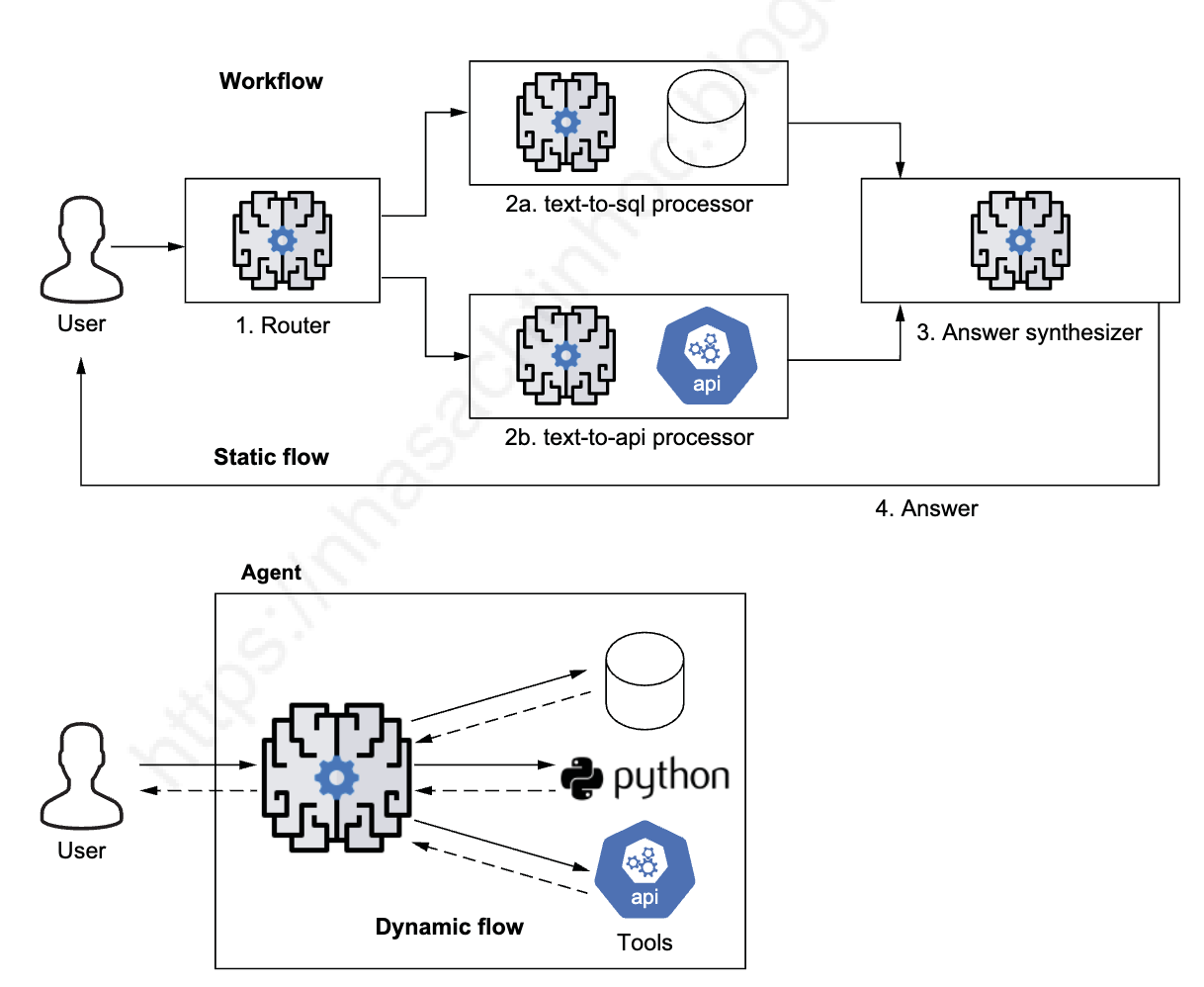 Figure 2.4: Workflows and agents. Workflows use the LLM to choose the next step from a fixed set of options, such as routing a request to a SQL database or a REST API, and synthesizing the answer with the related results. Agents, however, dynamically select and combine tools to achieve their objectives.
While both patterns rely on the LLM to drive application behavior, workflows maintain a structured and predictable path, whereas agents can adapt in real time based on new information and shifting goals. Let’s discuss workflows in more detail next.
Workflows
Workflows use the LLM to select the next step from a limited set of predefined choices. They typically implement patterns such as Controller-Worker or Router, as illustrated in Figure 2.5.
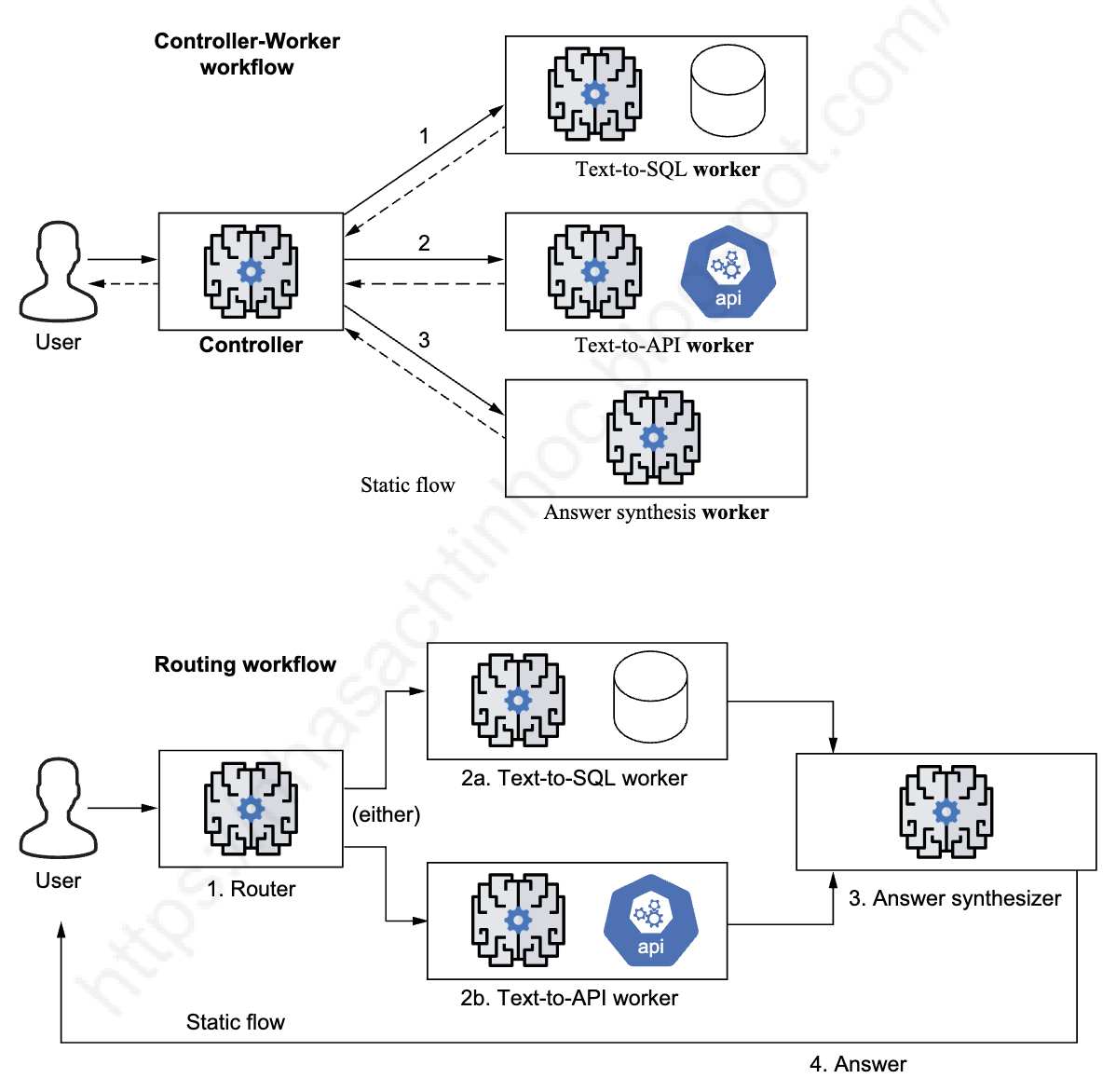 Figure 2.5: Common workflow patterns. The Controller-Worker pattern uses the LLM in the controller to orchestrate the flow by assigning various tasks to workers in a specific sequence. In the Router pattern, the LLM simply directs the task to the appropriate worker based on the context.
Controller-Worker Pattern: The controller orchestrates the workflow by spawning tasks for workers in a predefined sequence. The LLM acts as the “brain” that decides which worker to activate next, but the overall flow remains structured and predictable.
Example: A research workflow might have workers for web search, summarization, quality checking, and refinement. The controller uses the LLM to decide: “Search completed → now summarize. Summary quality poor → send to refinement worker. Quality good → proceed to final output.” The sequence is predefined, but the LLM chooses the path based on intermediate results.
Router Pattern: The LLM acts as a traffic director, routing incoming requests to the appropriate processor (or worker) based on context. This is simpler than Controller-Worker since there’s no complex sequencing—just intelligent routing to the right destination.
Example: A customer support chatbot receives a question. The LLM analyzes the question and routes it: technical question → technical support worker, billing question → billing worker, general inquiry → FAQ worker. There’s no sequence—just one routing decision.
This article will focus on workflows, demonstrating how to build agentic workflows with LangGraph and transition from the chain-based approaches we’ve used in previous parts.
Agents
While workflows follow predefined paths, agents take a more autonomous approach. LLM-based agents use language models to perceive data, reason about it, decide on actions, and achieve goals. Advanced agents can:
- Retain memory of past interactions
- Build dynamic workflows on the fly
- Learn from feedback to improve over time
Unlike fixed prompt–response systems or structured workflows, agents generate new flows based on real-time data and available tools. They’re not limited to choosing from predefined options—instead, they can combine tools in creative ways to solve problems.
This article focuses on workflows as a foundation. We’ll cover multi-tool agents and more complex multi-agent systems in Part 5 of this series.
When to Use Agent-Based Architectures
The concepts of LLM-based workflows and agents are closely related and often overlap, with no sharp dividing line between them. Both approaches are most valuable when your application needs to:
- Break complex tasks into smaller, manageable steps
- Make decisions based on previous results
- Access external tools or data during execution
- Maintain context throughout extended interactions
It’s best to adopt agentic workflows or agents when your use case genuinely benefits from explicit state management and dynamic control—balancing the added power against the increased complexity.
📚 RECOMMENDED READING: For a deeper understanding of workflows, agents, and when to use them, I highly recommend Anthropic’s article “Building Effective Agents”. It provides excellent practical guidance on choosing the right architecture for your specific needs.
Agent Development Frameworks
A variety of frameworks are available for building agent-based systems, each with its own focus and tradeoffs:
-
AutoGPT—Emphasizes fully autonomous, goal-driven agents with minimal supervision, but can face challenges with task consistency.
-
CrewAI—Enables the creation of collaborative, multi-agent systems for specialized teams by using templates that can be created and shared across the community.
-
LangGraph—Enables the creation of stateful, persistent agentic workflows using graph-based execution. LangGraph is powerful for complex applications, although it may require more technical expertise.
-
LlamaIndex—Stands out in knowledge retrieval, though its scope is narrower than broader agent frameworks.
-
Microsoft Autogen—Supports highly customizable multi-agent conversations, but comes with a steeper learning curve.
-
Microsoft Semantic Kernel—Prioritizes memory and planning, and it integrates well with Azure services.
-
n8n and LangFlow—Provide a visual interface and extensive integrations, making it accessible to nondevelopers, though advanced reasoning may require additional components.
-
OpenAI Agent SDK and Google Agent Development Kit (ADK)—Provide streamlined APIs for developing multi-agent systems and agentic workflows efficiently.
LangGraph Basics
LangGraph builds on LangChain to manage more complex agentic workflows with branching paths, stateful processing, and clear transitions between steps. It’s a framework for building stateful, multi-step AI applications using a graph-based structure.
In LangGraph:
- Nodes represent individual tasks, such as generating text, calling an API, or analyzing data
- Edges define the paths that connect these tasks
- State is information that moves between nodes and updates at each step
This structure is more powerful than traditional chains when you need to make decisions, manage state, or handle complex agentic workflows.
NOTE: LangGraph isn’t a replacement for LangChain—it’s an extension. Think of LangChain as providing the building blocks and LangGraph as offering a blueprint to connect those parts into a complex system. LangChain gives you components such as LLMs, embeddings, and retrievers, while LangGraph helps you organize those components into a structured, stateful workflow.
To use LangGraph effectively, you need to understand a few key concepts: the core components of a graph (nodes and edges), how state flows through the graph, and how conditional edges control its behavior. These are the building blocks we’ll explore next.
Moving from LangChain Chains to LangGraph
LangChain’s simple, linear chains work well for straightforward tasks but have limitations when your applications grow more complex. A typical LangChain setup often looks like this:
chain = (
    prompt_template
    | llm
    | output_parser
)
This setup struggles when tasks need to split into different paths, when you need to repeat steps based on new information, or when you want to manage state across multiple steps. It also falls short when multiple processes need to happen in parallel.
LangGraph solves these problems by offering:
- Better state management—Define and track data consistently across the workflow, essential for memory and reasoning
- Conditional branching—Take different paths based on previous results, making decision-making smoother
- Cyclical workflows—Repeat tasks until specific conditions are met, helping refine results
LangGraph also makes it easier to understand and debug complex workflows. Its graph-based structure offers a clearer view of how data flows through the system, which helps when you need to trace or fix problems.
This graph-based approach works well for a range of use cases:
- Multi-step reasoning and task planning
- Managing context in long conversations
- Coordinating research tasks
- Automating business processes
As your applications become more complex, the benefits of using LangGraph’s agent-based architecture become clearer. It gives you the control and flexibility needed to build intelligent, multi-step systems that can adapt and make decisions autonomously.
LangGraph Core Components
LangGraph provides a robust framework for building stateful, multi-step AI applications. Figure 2.6 illustrates the core components that form the foundation of a LangGraph application.
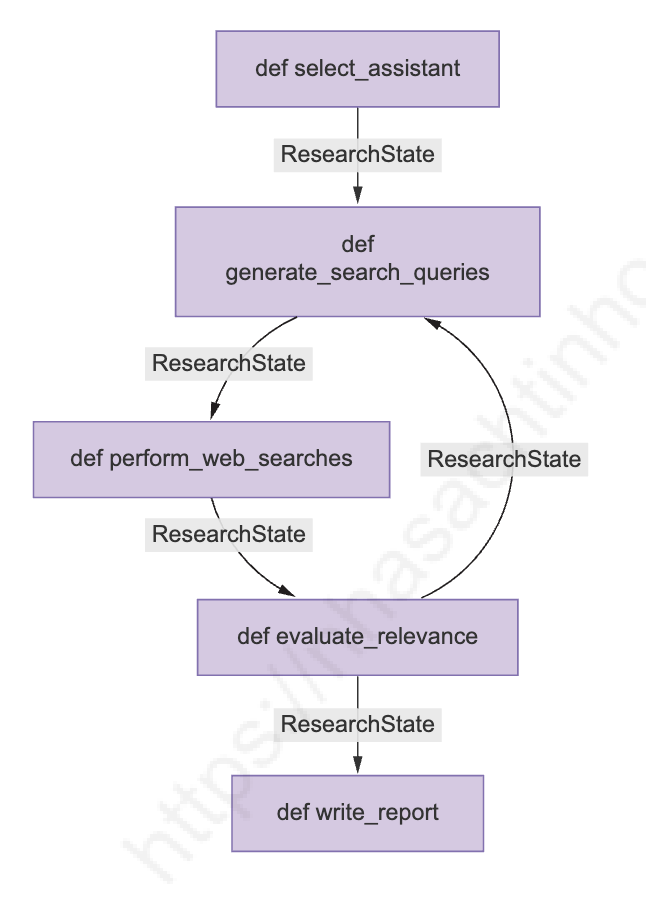 Figure 2.6: LangGraph core components. A strongly typed state (in this example, modeled with ResearchState) flows through the workflow. Nodes, usually Python functions (e.g.,
 def select_assistant), perform tasks, and edges create directed data flows between nodes—in some cases, with conditional paths.
At the heart of every LangGraph application is a state object—in our example, ResearchState—which defines a clear, strongly typed state for the entire workflow. This state is typically defined as a Python TypedDict, ensuring that data passed between components is well-structured and type-checked.
In a LangGraph, each node functions as a processing unit. Nodes can handle tasks such as:
- Generating search queries
- Calling external APIs
- Summarizing results
- Transforming data
These nodes are usually implemented as Python functions.
The edges between nodes determine the directed flow of data, defining how information moves through the graph. One of LangGraph’s powerful features is its conditional edges, which allow you to define dynamic execution paths based on the runtime state. Combined with entry points and end conditions, this gives you full control over where the graph begins, how it progresses, and when it completes.
The following sections will walk through how to define and connect these components, enabling you to build systems that can handle complex workflows and adaptive decision-making.
StateGraph Structure
A core utility in LangGraph is the StateGraph class, which you use to define the graph that models your application’s workflow. For example:
from langgraph.graph import StateGraph
from typing import TypedDict

class ResearchState(TypedDict):
    input_query: str
    intermediate_result: str
    final_output: str

graph = StateGraph(ResearchState)
State Management and Typing
State management is central to LangGraph applications. Unlike chain-based methods that rely on implicit or loosely typed state, LangGraph enforces explicit, strongly typed state, making workflows more robust and predictable. Here’s an extended version of the ResearchState that adds more detail:
from typing import TypedDict, Optional, List

class ResearchState(TypedDict):
    user_question: str
    assistant_info: Optional[dict]
    search_queries: Optional[List[dict]]
    search_results: Optional[List[dict]]
    research_summary: Optional[str]
    final_report: Optional[str]
Each node receives the current state and returns updates that merge into the overall state:
def process_node(state: dict) -> dict:
    result = do_something(state["input_data"])
    return {"output_data": result}
Node Functions and Edge Definitions
Nodes represent processing steps. Each node is a function that takes the current state and returns updates. For instance:
def generate_search_queries(state: dict) -> dict:
    """Generate search queries based on user question."""
    question = state["user_question"]
    queries = llm_generate_queries(question)
    return {"search_queries": queries}

graph.add_node("generate_queries", generate_search_queries)
Edges define valid transitions between nodes. A simple linear edge looks like this:
graph.add_edge("generate_queries", "perform_searches")A conditional edge uses a function to choose the next node based on the state:
def should_refine_queries(state: dict) -> str:
    if len(state["search_results"]) < 2:
        return "refine_queries"
    else:
        return "summarize_results"

graph.add_conditional_edge("perform_searches", should_refine_queries)
Entry Points and End Conditions
Every graph needs a starting point and clear end conditions. For example:
graph.set_entry_point("parse_question")

from langgraph.graph import END
graph.add_edge("write_final_report", END)
We’ll explore a practical application of LangGraph next. This is where the concepts introduced in this section—typed state, node functions, edges, entry points, and end conditions—come together in a realistic workflow.
🛠️ HANDS-ON PRACTICE: Continue to Part 2.3.1: Building Agentic Workflows with LangGraph - Practical Implementation for a step-by-step guide on transforming the web research assistant into an agentic workflow.
Các mô hình ngôn ngữ lớn (LLM) đang thúc đẩy một thế hệ ứng dụng mới đòi hỏi nhiều hơn là các trao đổi prompt–response đơn giản. Khi các ứng dụng trở nên phức tạp hơn, agentic workflows (quy trình làm việc tự động) đã trở nên thiết yếu—một mẫu thiết kế trong đó LLM điều phối một quy trình có cấu trúc, đa bước sử dụng các thành phần được định nghĩa trước và quản lý trạng thái rõ ràng.
Agentic workflows tuân theo một chuỗi các bước được định nghĩa rõ ràng và nhất quán. Thay vì điều chỉnh hành vi một cách linh hoạt trong quá trình thực thi, chúng nhấn mạnh vào độ tin cậy, tính minh bạch và khả năng kiểm soát. Trong cách tiếp cận này, LLM đưa ra quyết định trong các ranh giới được xác định rõ ràng, đảm bảo rằng mỗi giai đoạn của quy trình vẫn có cấu trúc và có thể tái tạo. Trong các bài sau của series, chúng ta sẽ khám phá các kiến trúc agent xây dựng dựa trên các nguyên tắc này để đạt được tính tự chủ và khả năng thích ứng cao hơn.
Bài viết này bao gồm:
- Tổng quan về agentic workflows và agents
- Các nguyên tắc cơ bản của LangGraph và quản lý trạng thái
- Chuyển đổi từ LangChain chains sang agentic workflow
Hiểu về Agentic Workflows và Agents
Các hệ thống dựa trên LLM thường tuân theo một trong hai mẫu thiết kế cốt lõi: agentic workflows và agents. Mỗi mẫu định hình cách ứng dụng hoạt động, như được minh họa trong Hình 2.4. Vì các thuật ngữ này thường được sử dụng thay thế cho nhau—nhưng có những khác biệt quan trọng—điều cần thiết là phải hiểu chính xác ý nghĩa của từng thuật ngữ trước khi đi sâu hơn:
-
Agentic workflow (hay đơn giản là workflow)—Hướng dẫn ứng dụng thông qua một chuỗi các bước được xác định trước cố định. LLM được sử dụng để chọn từ các tùy chọn được định nghĩa sẵn, giúp hệ thống hoàn thành các tác vụ và quản lý luồng tổng thể.
-
Agent—Sử dụng mô hình ngôn ngữ cho nhiều hơn là chỉ thực thi tác vụ: chúng suy luận, đưa ra quyết định và xác định động các bước tiếp theo dựa trên các công cụ có sẵn và ngữ cảnh đang phát triển. Ở đây, một tool (công cụ) thường đề cập đến một hàm trả về hoặc xử lý dữ liệu.
Hình 2.4: Workflows và agents. Workflows sử dụng LLM để chọn bước tiếp theo từ một tập hợp các tùy chọn cố định, chẳng hạn như định tuyến yêu cầu đến SQL database hoặc REST API, và tổng hợp câu trả lời với các kết quả liên quan. Ngược lại, agents tự quyết định chọn và kết hợp các công cụ trong quá trình thực thi để đạt được mục tiêu—không theo kế hoạch định trước mà dựa trên tình huống thực tế.
Mặc dù cả hai mẫu đều dựa vào LLM để điều khiển hành vi của ứng dụng, workflows duy trì một đường đi có cấu trúc và dự đoán được, trong khi agents có thể thích ứng linh hoạt theo thời gian thực dựa trên thông tin mới và mục tiêu thay đổi. Hãy thảo luận chi tiết hơn về workflows tiếp theo.
Workflows
Workflows sử dụng LLM để chọn bước tiếp theo từ một tập hợp các lựa chọn được định nghĩa trước giới hạn. Chúng thường triển khai các mẫu như Controller-Worker hoặc Router, như được minh họa trong Hình 2.5.
Hình 2.5: Các mẫu workflow phổ biến. Mẫu Controller-Worker sử dụng LLM trong controller để điều phối luồng bằng cách gán các tác vụ khác nhau cho workers theo một trình tự cụ thể. Trong mẫu Router, LLM chỉ đơn giản là định hướng tác vụ đến worker phù hợp dựa trên ngữ cảnh.
Mẫu Controller-Worker: Controller điều phối workflow bằng cách tạo các tác vụ cho workers theo một trình tự được định nghĩa trước. LLM đóng vai trò là “bộ não” quyết định worker nào sẽ được kích hoạt tiếp theo, nhưng luồng tổng thể vẫn có cấu trúc và dự đoán được.
Ví dụ: Một quy trình nghiên cứu có thể có các workers cho tìm kiếm web, tóm tắt, kiểm tra chất lượng và tinh chỉnh. Controller sử dụng LLM để quyết định: “Tìm kiếm xong → bây giờ tóm tắt. Chất lượng tóm tắt kém → gửi đến worker tinh chỉnh. Chất lượng tốt → tiến hành xuất kết quả cuối cùng.” Trình tự đã được định nghĩa sẵn, nhưng LLM chọn đường đi dựa trên kết quả trung gian.
Mẫu Router: LLM đóng vai trò như một bộ điều hướng giao thông, định tuyến các yêu cầu đến đúng bộ xử lý (hoặc worker) dựa trên ngữ cảnh. Điều này đơn giản hơn Controller-Worker vì không có trình tự phức tạp—chỉ là định tuyến thông minh đến đích đúng.
Ví dụ: Một chatbot hỗ trợ khách hàng nhận được câu hỏi. LLM phân tích câu hỏi và định tuyến: câu hỏi kỹ thuật → worker hỗ trợ kỹ thuật, câu hỏi thanh toán → worker thanh toán, câu hỏi chung → worker FAQ. Không có trình tự—chỉ có một quyết định định tuyến.
Bài viết này sẽ tập trung vào workflows, minh họa cách xây dựng agentic workflows với LangGraph và chuyển đổi từ các cách tiếp cận dựa trên chain mà chúng ta đã sử dụng trong các phần trước.
Agents
Trong khi workflows tuân theo các đường đi được định nghĩa trước, agents áp dụng cách tiếp cận tự chủ hơn. Agents dựa trên LLM sử dụng mô hình ngôn ngữ để cảm nhận dữ liệu, suy luận về nó, quyết định hành động và đạt được mục tiêu. Agents nâng cao có thể:
- Lưu trữ bộ nhớ về các tương tác trong quá khứ
- Xây dựng workflows động một cách linh hoạt
- Học từ phản hồi để cải thiện theo thời gian
Khác với các hệ thống prompt–response cố định hoặc workflows có cấu trúc, agents tạo ra các luồng mới dựa trên dữ liệu thời gian thực và các công cụ có sẵn. Chúng không bị giới hạn trong việc chọn từ các tùy chọn được định nghĩa trước—thay vào đó, chúng có thể kết hợp các công cụ theo những cách sáng tạo để giải quyết vấn đề.
Bài viết này tập trung vào workflows như một nền tảng. Chúng ta sẽ đề cập đến multi-tool agents và các hệ thống multi-agent phức tạp hơn trong Phần 5 của series.
Khi Nào Nên Sử Dụng Kiến Trúc Agent-Based
Các khái niệm về workflows và agents dựa trên LLM có liên quan chặt chẽ và thường chồng chéo lên nhau, không có ranh giới rõ ràng giữa chúng. Cả hai cách tiếp cận đều có giá trị nhất khi ứng dụng của bạn cần:
- Chia nhỏ các tác vụ phức tạp thành các bước nhỏ hơn, dễ quản lý
- Đưa ra quyết định dựa trên kết quả trước đó
- Truy cập các công cụ hoặc dữ liệu bên ngoài trong quá trình thực thi
- Duy trì ngữ cảnh trong suốt các tương tác kéo dài
Tốt nhất là áp dụng agentic workflows hoặc agents khi use case của bạn thực sự hưởng lợi từ quản lý trạng thái rõ ràng và khả năng điều chỉnh luồng thực thi—cân bằng giữa sức mạnh bổ sung và độ phức tạp tăng thêm.
📚 ĐỌC THÊM: Để hiểu sâu hơn về workflows, agents và khi nào nên sử dụng chúng, tôi đặc biệt khuyến nghị bài viết “Building Effective Agents” của Anthropic. Bài viết cung cấp hướng dẫn thực tế xuất sắc về việc chọn kiến trúc phù hợp cho nhu cầu cụ thể của bạn.
Các Framework Phát Triển Agent
Có nhiều framework khác nhau để xây dựng các hệ thống agent-based, mỗi framework có trọng tâm và đánh đổi riêng:
-
AutoGPT—Nhấn mạnh vào các agent tự chủ hoàn toàn, hướng đến mục tiêu với ít giám sát, nhưng có thể gặp thách thức về tính nhất quán của tác vụ.
-
CrewAI—Cho phép tạo các hệ thống multi-agent cộng tác cho các nhóm chuyên biệt bằng cách sử dụng templates có thể được tạo và chia sẻ trong cộng đồng.
-
LangGraph—Cho phép tạo các agentic workflows có trạng thái, bền vững bằng cách sử dụng graph-based execution. LangGraph mạnh mẽ cho các ứng dụng phức tạp, mặc dù có thể yêu cầu nhiều chuyên môn kỹ thuật hơn.
-
LlamaIndex—Nổi bật trong knowledge retrieval (truy xuất kiến thức), mặc dù phạm vi của nó hẹp hơn so với các agent frameworks rộng hơn.
-
Microsoft Autogen—Hỗ trợ các cuộc hội thoại multi-agent có khả năng tùy chỉnh cao, nhưng đi kèm với đường cong học tập dốc hơn.
-
Microsoft Semantic Kernel—Ưu tiên memory và planning, và tích hợp tốt với các dịch vụ Azure.
-
n8n và LangFlow—Cung cấp giao diện trực quan và tích hợp mở rộng, giúp những người không phải developer cũng tiếp cận được, mặc dù suy luận nâng cao có thể yêu cầu các thành phần bổ sung.
-
OpenAI Agent SDK và Google Agent Development Kit (ADK)—Cung cấp các API được tối ưu hóa để phát triển các hệ thống multi-agent và agentic workflows một cách hiệu quả.
Các Nguyên Tắc Cơ Bản Của LangGraph
LangGraph xây dựng dựa trên LangChain để quản lý các agentic workflows phức tạp hơn với các nhánh rẽ, xử lý có trạng thái và chuyển đổi rõ ràng giữa các bước. Đây là một framework để xây dựng các ứng dụng AI có trạng thái, đa bước sử dụng cấu trúc dựa trên đồ thị (graph).
Trong LangGraph:
- Nodes (nút) đại diện cho các tác vụ riêng lẻ, chẳng hạn như tạo văn bản, gọi API hoặc phân tích dữ liệu
- Edges (cạnh) định nghĩa các đường đi kết nối các tác vụ này
- State (trạng thái) là thông tin di chuyển giữa các nút và được cập nhật ở mỗi bước
Cấu trúc này mạnh mẽ hơn các chain truyền thống khi bạn cần đưa ra quyết định, quản lý trạng thái hoặc xử lý các agentic workflows phức tạp.
LƯU Ý: LangGraph không phải là sự thay thế cho LangChain—mà là một phần mở rộng. Hãy nghĩ về LangChain như cung cấp các khối xây dựng và LangGraph như cung cấp bản thiết kế để kết nối các phần đó thành một hệ thống phức tạp. LangChain cung cấp cho bạn các thành phần như LLMs, embeddings và retrievers, trong khi LangGraph giúp bạn tổ chức các thành phần đó thành một workflow có cấu trúc và có trạng thái.
Để sử dụng LangGraph hiệu quả, bạn cần hiểu một số khái niệm chính: các thành phần cốt lõi của đồ thị (nodes và edges), cách state di chuyển qua đồ thị và cách conditional edges kiểm soát hành vi của nó. Đây là các khối xây dựng mà chúng ta sẽ khám phá tiếp theo.
Chuyển Đổi Từ LangChain Chains Sang LangGraph
Các chain tuyến tính đơn giản của LangChain hoạt động tốt cho các tác vụ đơn giản nhưng có giới hạn khi ứng dụng của bạn trở nên phức tạp hơn. Một thiết lập LangChain điển hình thường trông như thế này:
chain = (
    prompt_template
    | llm
    | output_parser
)
Thiết lập này gặp khó khăn khi các tác vụ cần tách thành các đường đi khác nhau, khi bạn cần lặp lại các bước dựa trên thông tin mới, hoặc khi bạn muốn quản lý trạng thái qua nhiều bước. Nó cũng không đáp ứng được khi nhiều quy trình cần xảy ra song song.
LangGraph giải quyết các vấn đề này bằng cách cung cấp:
- Quản lý trạng thái tốt hơn—Định nghĩa và theo dõi dữ liệu một cách nhất quán trong suốt workflow, điều cần thiết cho bộ nhớ và suy luận
- Conditional branching (rẽ nhánh có điều kiện)—Đi theo các đường đi khác nhau dựa trên kết quả trước đó, giúp việc đưa ra quyết định mượt mà hơn
- Cyclical workflows (quy trình tuần hoàn)—Lặp lại các tác vụ cho đến khi đáp ứng các điều kiện cụ thể, giúp tinh chỉnh kết quả
LangGraph cũng giúp hiểu và debug các workflows phức tạp dễ dàng hơn. Cấu trúc dựa trên đồ thị của nó cung cấp cái nhìn rõ ràng hơn về cách dữ liệu chảy qua hệ thống, điều này hữu ích khi bạn cần theo dõi hoặc sửa lỗi.
Cách tiếp cận dựa trên đồ thị này hoạt động tốt cho một loạt các use case:
- Suy luận đa bước và lập kế hoạch nhiệm vụ
- Quản lý ngữ cảnh trong các cuộc hội thoại dài
- Điều phối các tác vụ nghiên cứu
- Tự động hóa quy trình kinh doanh
Khi ứng dụng của bạn trở nên phức tạp hơn, lợi ích của việc sử dụng kiến trúc agent-based của LangGraph trở nên rõ ràng hơn. Nó cung cấp cho bạn khả năng kiểm soát và tính linh hoạt cần thiết để xây dựng các hệ thống thông minh, đa bước có thể thích ứng và tự đưa ra quyết định.
Các Thành Phần Cốt Lõi Của LangGraph
LangGraph cung cấp một framework mạnh mẽ để xây dựng các ứng dụng AI có trạng thái, đa bước. Hình 2.6 minh họa các thành phần cốt lõi tạo nên nền tảng của một ứng dụng LangGraph.
Hình 2.6: Các thành phần cốt lõi của LangGraph. Một state có kiểu dữ liệu rõ ràng (trong ví dụ này, được mô hình hóa bằng ResearchState) chảy qua workflow. Các nodes, thường là các hàm Python (ví dụ: def select_assistant), thực hiện các tác vụ, và các edges tạo luồng dữ liệu có hướng giữa các nodes—trong một số trường hợp, với các đường đi có điều kiện.
Ở trung tâm của mọi ứng dụng LangGraph là một state object (đối tượng trạng thái)—trong ví dụ của chúng ta là ResearchState—định nghĩa một trạng thái rõ ràng, có kiểu dữ liệu cụ thể cho toàn bộ workflow. State này thường được định nghĩa dưới dạng TypedDict của Python, đảm bảo rằng dữ liệu được truyền giữa các thành phần có cấu trúc tốt và được đảm bảo đúng kiểu dữ liệu.
Trong LangGraph, mỗi node (nút) hoạt động như một đơn vị xử lý. Các nodes có thể xử lý các tác vụ như:
- Tạo các truy vấn tìm kiếm
- Gọi các API bên ngoài
- Tóm tắt kết quả
- Chuyển đổi dữ liệu
Các nodes này thường được triển khai dưới dạng các hàm Python.
Các edges (cạnh) giữa các nodes xác định luồng dữ liệu có hướng, định nghĩa cách thông tin di chuyển qua đồ thị. Một trong những tính năng mạnh mẽ của LangGraph là conditional edges (cạnh có điều kiện), cho phép bạn định nghĩa các đường thực thi động dựa trên trạng thái tại thời điểm chạy. Kết hợp với các điểm bắt đầu và điều kiện kết thúc, điều này cho phép bạn kiểm soát hoàn toàn nơi đồ thị bắt đầu, cách nó tiến triển và khi nào nó hoàn thành.
Các phần tiếp theo sẽ hướng dẫn cách định nghĩa và kết nối các thành phần này, giúp bạn xây dựng các hệ thống có thể xử lý các workflows phức tạp và đưa ra quyết định thích ứng.
Cấu Trúc StateGraph
Một tiện ích cốt lõi trong LangGraph là class StateGraph, được sử dụng để định nghĩa đồ thị mô hình hóa workflow của ứng dụng. Ví dụ:
from langgraph.graph import StateGraph
from typing import TypedDict

class ResearchState(TypedDict):
    input_query: str
    intermediate_result: str
    final_output: str

graph = StateGraph(ResearchState)
Quản Lý Trạng Thái và Kiểu Dữ Liệu
Quản lý trạng thái là trung tâm của các ứng dụng LangGraph. Không giống như các phương pháp dựa trên chain phụ thuộc vào trạng thái ngầm định hoặc kiểu dữ liệu lỏng lẻo, LangGraph áp dụng trạng thái rõ ràng với kiểu dữ liệu cụ thể, giúp workflows mạnh mẽ và dự đoán được hơn. Đây là phiên bản mở rộng của ResearchState với nhiều chi tiết hơn:
from typing import TypedDict, Optional, List

class ResearchState(TypedDict):
    user_question: str
    assistant_info: Optional[dict]
    search_queries: Optional[List[dict]]
    search_results: Optional[List[dict]]
    research_summary: Optional[str]
    final_report: Optional[str]
Mỗi node nhận trạng thái hiện tại và trả về các cập nhật được hợp nhất vào trạng thái tổng thể:
def process_node(state: dict) -> dict:
    result = do_something(state["input_data"])
    return {"output_data": result}
Hàm Node và Định Nghĩa Edge
Các nodes đại diện cho các bước xử lý. Mỗi node là một hàm nhận trạng thái hiện tại và trả về các cập nhật. Ví dụ:
def generate_search_queries(state: dict) -> dict:
    """Tạo các truy vấn tìm kiếm dựa trên câu hỏi của người dùng."""
    question = state["user_question"]
    queries = llm_generate_queries(question)
    return {"search_queries": queries}

graph.add_node("generate_queries", generate_search_queries)
Các edges định nghĩa các chuyển đổi hợp lệ giữa các nodes. Một edge tuyến tính đơn giản trông như thế này:
graph.add_edge("generate_queries", "perform_searches")Một conditional edge (edge có điều kiện) sử dụng một hàm để chọn node tiếp theo dựa trên trạng thái:
def should_refine_queries(state: dict) -> str:
    if len(state["search_results"]) < 2:
        return "refine_queries"
    else:
        return "summarize_results"

graph.add_conditional_edge("perform_searches", should_refine_queries)
Điểm Bắt Đầu và Điều Kiện Kết Thúc
Mỗi đồ thị cần có một điểm bắt đầu và các điều kiện kết thúc rõ ràng. Ví dụ:
graph.set_entry_point("parse_question")

from langgraph.graph import END
graph.add_edge("write_final_report", END)
Tiếp theo, chúng ta sẽ khám phá một ứng dụng thực tế của LangGraph. Đây là nơi các khái niệm được giới thiệu trong phần này—state có kiểu dữ liệu cụ thể, hàm nodes, edges, điểm bắt đầu và điều kiện kết thúc—kết hợp với nhau trong một workflow thực tế.
🛠️ THỰC HÀNH: Tiếp tục đến Phần 2.3.1: Xây Dựng Agentic Workflows với LangGraph - Thực Hành để có hướng dẫn từng bước về cách chuyển đổi web research assistant thành một agentic workflow.